

Online learning has exploded over the past few years, and the way people learn has shifted with it. Rather than blocking off two straight hours at a desk, learners (who often have jobs and responsibilities) now take lessons on their phones during coffee breaks, train rides, and the ten quiet minutes before bed.
The problem is, many learning programs haven’t caught up. They’re still built for desktop learning, which means they’re out of sync with how people learn now. If yours is one of them, you’re losing engagement and leaving revenue on the table.
This article breaks down three opportunities you’re missing, and how to take advantage of them.
Skip ahead:
- Opportunity 1: Meet learners in the moments they have
- Opportunity 2: Turn learning into a habit, not a task
- Opportunity 3: Build a stronger, more visible brand experience
- What this means for your learning strategy
- Where branded mobile fits into your strategy
- Build for how your learners actually learn
Opportunity 1: Meet learners in the moments they have
If your learners are squeezing lessons into 15-minute windows, a two-hour video lecture is the fastest way to lose them. Long videos feel like a commitment before they’ve even pressed play, and when life interrupts (which it will), learners lose their place and eventually stop coming back.
Instead, break your content into shorter videos, ideally 5–10 minutes each. Short videos are easier to finish in one sitting, easier to rewatch, and give learners a small sense of progress every time they check in. Instead of one intimidating block, they see a clear path of bite-sized wins.
Make those videos accessible on mobile, so learners can watch on their phones wherever they are.
This provides:
- Instant access. They can open a lesson the moment they have a spare minute, without waiting to get home to a laptop.
- Seamless continuation. They pick up exactly where they left off, whether they switched devices or came back three days later.
- Lower friction to engage. Opening an app on a phone takes two seconds. But booting a laptop, finding the right tab, and logging in takes a few minutes, and many learners just won’t bother.
Designing your learning program for short windows translates to:
- More frequent engagement. Learners return throughout the week instead of waiting for a free Sunday, which rarely comes. This adds up to more total time in your program.
- Higher completion rates. Short videos are easy to finish, and every completed lesson makes a learner more likely to start the next one.
- Reduced drop-off. When you remove the friction that makes learners quit—like long videos, clunky playback, and lost progress—they stay long enough to see results, which is also long enough to renew their subscription and/or recommend you.
Opportunity 2: Turn learning into a habit, not a task
Desktop-oriented programs require learners to block off time, sit down at a computer, and focus. This works for learners with open schedules, but if most of your audience has jobs, kids, and errands to run, they may struggle to keep up.
Mobile learning, however, encourages a learning habit. When videos are short and easy to finish, learners don’t have to psych themselves up to start. They can pull out their phone during a lunch break and think, “let me knock out a couple of lessons before I head back,” and actually do it. The bar to engage is low enough that showing up doesn’t feel like a hurdle.
You could even enable push notifications to remind them to take a lesson. A well-timed nudge (“You’re three lessons away from finishing module 2”) can pull learners back the same way Duolingo pulls people back to their streak.
The more often learners return, the more likely they are to:
- Complete content because progress compounds when they chip away at it daily instead of doing a big chunk once a week.
- Stay engaged because frequent check-ins keep your material fresh between sessions.
- Continue learning because habit carries them through the middle stretch of a course, where most learners drop off.
- Build momentum across courses because finishing one program primes them to start the next one.
Here’s how this helps your business:
- Increased session frequency. More touchpoints mean more chances to deliver value and keep learners invested.
- Stronger retention. Frequent returners are harder to lose, which means fewer abandoned courses.
- Higher long-term engagement. Habitual learners stay active long enough to renew, upgrade, and recommend you to others.
Opportunity 3: Build a stronger, more visible brand experience
The experience you provide learners shapes how they feel about your brand, and desktop-based learning is not ideal.
With a desktop, your program sits in one of many open tabs, competing with email, Slack, and whatever else your learners have going on. Your logo shrinks to a 16-pixel favicon, and the program ends up not feeling important enough for learners to prioritize.
A mobile-optimized learning program prevents this by helping you:
- Position your brand front and center. Your app lives on their home screen next to apps learners already use daily, so they see your brand every time they pick up their phone.
- Increase your reach through app stores. Listings on Google Play and the App Store make your program discoverable to people searching for learning apps in your niche, who might otherwise never find you.
- Own the experience end-to-end. Learners interact with your program through an interface you’ve designed, without the distractions of a browser or the branding of another platform getting in the way.
This encourages:
- Stronger trust. A dedicated app signals to learners that you’ve invested in the experience, which makes your program feel more established.
- Higher perceived value, which means learners are willing to pay more for what they see as a premium experience.
- Easier discovery, because app store search brings in learners who might otherwise never come across your website.
Here’s how that shows up on your bottom line:
- Increased credibility. A branded app makes your program look legitimate at a glance, making it easier to convert interested learners into paying customers.
- Better learner experience. A cleaner, faster, more focused interface keeps learners happier and more likely to stay.
- Revenue growth. In-app purchases, course upgrades, and subscription tiers all become easier to sell when the experience supports them.
What this means for your learning strategy
If you want learners to engage with your program, you have to stop designing for scheduled learning and start designing for accessible learning.
Scheduled learning assumes your audience has two free hours and the motivation to use them. But accessible learning meets them where they are, which is how you get them to engage more often and come back without being prompted.
Your learning experience should:
- Be accessible anytime, not just on desktop. Learners should be able to open a lesson from their phone during a commute, a break, or a waiting room, without needing to get to a computer first.
- Support quick, in-the-moment learning. Short lessons and bite-sized content let learners make progress in the 10 or 15 minutes they have, rather than forcing them to wait for a longer window.
- Make it easy to return and continue. Learners should be able to pick up exactly where they left off, without having to retrace their steps or re-watch content they’ve already completed.
- Fit into your learners’ daily routines. The program should feel like something learners can weave into their day, rather than something they have to rearrange their day around.
Where branded mobile fits into your strategy
A branded mobile app extends your learning experience beyond the desktop. It gives learners the kind of access that turns casual interest into daily engagement, because they can open your program whenever they want to, from wherever they are.
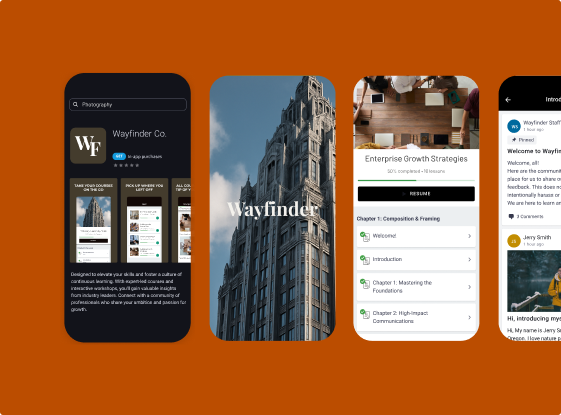
That’s why Thinkific offers a branded mobile app that we can help you customize with your logo and branding, and publish to the Google Play Store and Apple App Store.
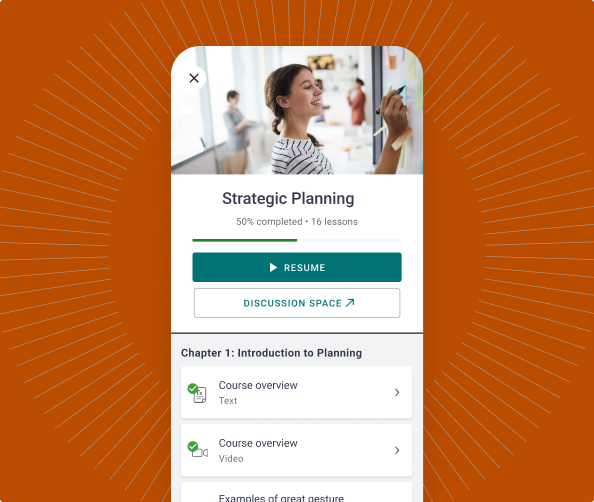
Here’s what the app brings to your program:
- Increased engagement. Learners can open your course during a commute, a lunch break, or a quiet moment at home, which means more frequent sessions and higher completion rates.
- Comprehensive content support. The app handles multiple content formats, including video, audio, text, PDFs, multimedia, quizzes, and assessments, so you don’t have to limit yourself to just video or text.
- Built-in learning logistics. The app manages course progression, drip schedules, and lesson prerequisites automatically, so your program stays structured without extra work on your end.
- Push notifications. You can send alerts for new lessons, community posts, and updates straight to learners’ phones, which is significantly more effective than email for grabbing attention.
- Centralized community. The app integrates Thinkific Communities, so learners can participate in discussions and engage with other students without needing to log into a browser.
- Easy promotion. Thinkific provides pre-made email templates and promotional materials, so you can easily tell your learners to download the app from the Apple App Store or Google Play Store.
The Thinkific branded mobile app removes friction for your learners and builds a more interactive community around your program, which helps you retain students and increase the value of your program.
Build for how your learners actually learn
Desktop-oriented learning programs are built around the assumption that learners will sit down, log in, and focus for long stretches. Some will, but many won’t, especially the ones juggling jobs, families, flexible routines, and everything else competing for their time.
If your program only works on desktop, you’re limiting how often those learners can engage, which means fewer course completions and less revenue for you.
Thinkific’s branded mobile app allows you to meet learners where they are. Your learners get an experience that fits into their day, and you get a program that shows up on their phones, not only their laptops.
Ready to build a learning experience your students would love?
Start your free Thinkific trial today.
Frequently asked questions
- Do I need to rebuild my entire course to make it mobile-friendly?
No. In most cases, you just need to restructure how your content is delivered. Break long videos into shorter segments, make sure your lessons are easy to navigate on a smaller screen, and host them on a platform that supports mobile access (like Thinkific). Your core content stays the same, just in a more digestible format.
- Is mobile learning effective for complex or technical topics?
Yes, when the content is structured well. Complex topics work best when broken into focused, sequential lessons that build on each other. Learners can revisit tough concepts as often as they need, and mobile access lets them review material during downtime, which often helps retention more than a single long session.
- Will a branded mobile app work for a small course business?
Yes. A branded app benefits small creators especially, because it gives your program a level of polish that’s hard to achieve through a website alone. It helps you stand out in a crowded market, builds trust with learners, and creates a dedicated space for your content without requiring a big team to manage.
- How do I get my learners to actually download the app?
Make it easy and give them a reason. Send clear instructions through email with direct links to the App Store and Google Play, highlight features they’ll get through the app (like offline access or push notifications), and remind them during onboarding. Thinkific provides templates to simplify this process.