

Since you found your way to this page, chances are you are a compliance manager or part of a learning and development team looking to improve your training records for when the inevitable audit occurs. You may have all the records available, however, the question is whether those records capture the right data in the right format.
Even if you do not fall into one of those two categories, maybe you are building a learning program, the manager of a training team, or are part of a learning academy, there are multiple scenarios that may require documented proof of employee training and certifications.
Regardless of your role, in regulated industries, training records are not just for internal reference: they are evidence. When an auditor, regulator, or client asks for proof of compliance, the last thing you want to do is spend hours scrambling to get your documentation in place.
This blog post is for those looking to improve their organization of documents for training records compliance, proof of training completion, and employee training documentation.
Whether you want to ensure your training records hold up in the event of an audit or are preparing for a new contract or regulatory requirement that requires documented proof of employee training and certifications, you’re in the right place.
Ready to build audit-ready training records? Skip ahead:
- What are audit-ready training records?
- Why training records compliance matters
- What audit-ready training records need to contain
- Internal training tracking vs. audit-ready training documentation
- Common gaps in training records
- How to build an audit-ready training records system
- Spreadsheet hygiene for teams not yet using dedicated software
- When spreadsheets stop being enough
- How software maintains audit-ready training records automatically
- Audit-ready training records checklist
- Key takeaway: Build compliance training records that hold up
Related: Top Compliance Training Software Options
What are audit-ready training records?
Training records are not just learning program data, they contain valuable compliance evidence that can be very convenient to have on hand in the (inevitable) event of an audit.
Audit-ready training records are comprehensive records that are structured, complete, and easily accessible on demand. Completion data may not be enough for an external review. Audit-ready training records showcase who completed what, when, under which requirements, and with what supporting evidence. They demonstrate how a learner completed required training according to the organization’s compliance, certification, or regulatory obligations.
Essentially, audit-ready training records should provide clarity on:
- Who completed the training?
- What training was completed?
- When was it assigned, started, and completed?
- Why was the training required?
- Which role, regulation, policy, certification, or competency did it support?
- Was there an assessment, attestation, certificate, or credential attached?
- Has the training expired or does it require renewal?
- Can the record be exported or shared in a consistent format?
Remember, when compiling training records, there is a key difference between basic tracking and audit-ready documentation: basic tracking is knowing if an employee or learner completed the course, whereas audit-ready documentation provides proof of the training timeline in a consistent format.
Why training records compliance matters
Besides saving many hours and a few headaches, having your training records in a row is often connected to safety, quality, privacy, product handling, professional standards, and customer obligations.
Training records are often reviewed during audits, inspections, certification renewals, contract reviews, and incident investigations. For example, regulators or clients may ask for proof that employees were trained before performing specific work. When these requests roll in, it’s helpful to have this data ready to go. Missing or incomplete records can create the impression that training didn’t happen, even if it did.
For example, in the context of life sciences and drug manufacturing, FDA CGMP rules require individuals to have complete records of education, training, and experience needed to perform their assigned functions. This makes training documentation more than an internal practice — it becomes part of a compliance record.
Non-compliance can be costly beyond the immediate audit itself. Ponemon Institute found that the average cost of non-compliance was significantly higher than the average cost of maintaining compliance. While training documentation is only one part of a compliance program, incomplete records increase time, effort, and risk involved when evidence is requested.
When records are incomplete or disorganized, documentation is unable to stand on its own or hold up to an auditor or client, which can cause unnecessary friction. To avoid these pain points, we’ll go over how to build audit-ready training records that meet training compliance standards.
What audit-ready training records need to contain
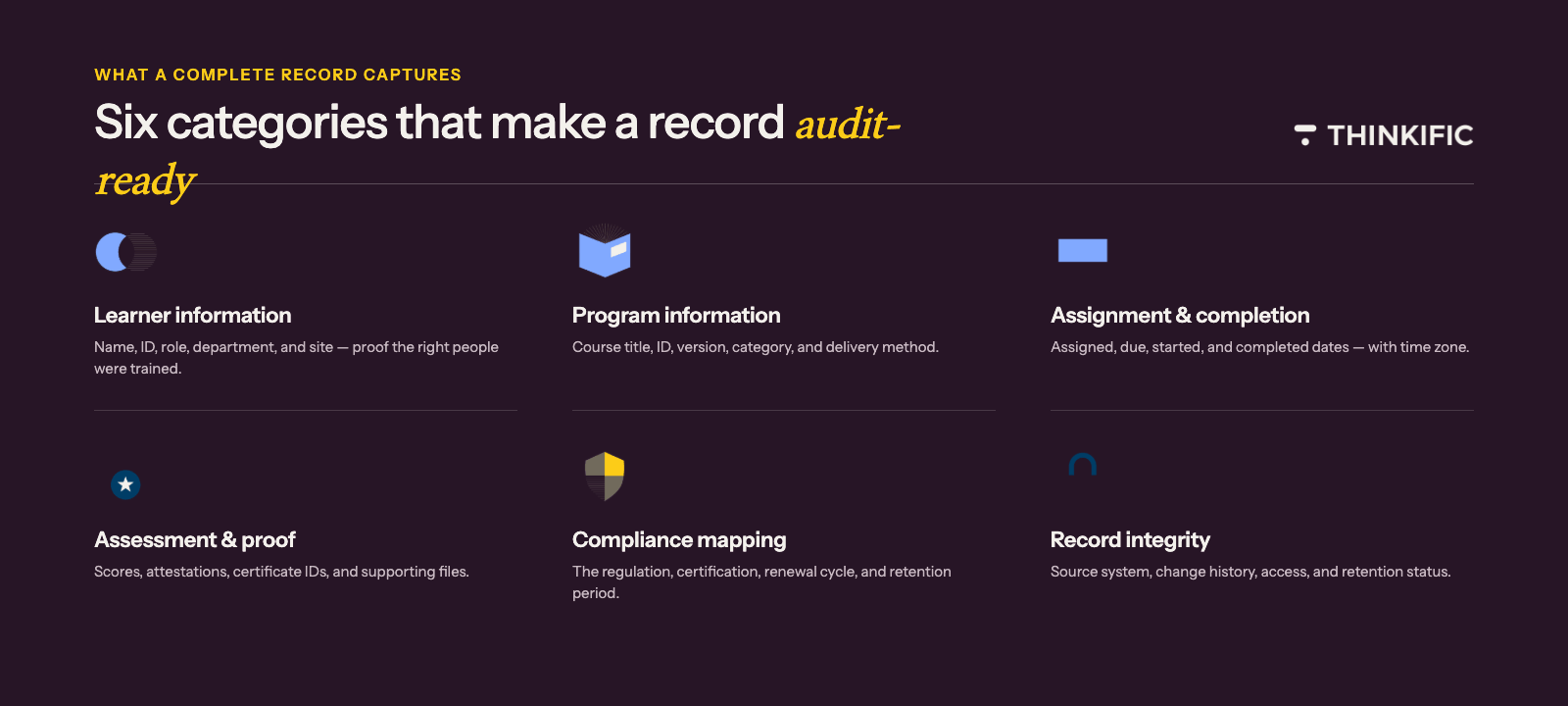
To prepare your training records for audit, there are a few core pieces of information that should always be captured to ensure the records are fully complete and consistent with what audit-reviewers are anticipating.
1. How to effectively capture learner information
The first essential component is the core learner information. Auditors will first look to confirm that the right population completed training. A completion without role, department, or employee identifiers may require more manual work in the long-run.
Here are the core fields to include for learner information:
- Learner full name
- Employee ID or learner ID
- Work email
- Department or business unit
- Job title or role
- Manager or supervisor
- Location, region, or site
- Employment status, if relevant
- Hire date or role start date, if relevant to onboarding requirements
Having this information readily available not only shows auditors you’re organized, it also makes internal tracking and processes easier on the organization’s end.
2. Essential training program information
Next, tracking program information provides clarity on what type of training was completed. This information can be extremely useful (both externally and internally). For example, if a policy, standard operating procedure (SOP), regulation, or product training module changes, the organization may need to show which version the learner completed.
Here are the core fields to include for training program information:
- Course or module title
- Course ID or training code
- Course version
- Training category
- Training owner
- Academy, program, or learning path
- Delivery method (online, instructor-led, blended, live webinar, or self-paced)
- Language or localization, if relevant
- Required versus optional status
Remember, if the course version isn’t documented properly, this can cause extra manual work down the road.
3. Assignment and completion data
Assignment and completion data demonstrate strong internal records. For example, showing that something was completed on June 8, 2026 at 10:47 a.m. Pacific Time is stronger than a simple checkbox.
Here are key assignment and completion data to include:
- Date assigned
- Due date
- Date started
- Date completed
- Time zone
- Completion status
- Completion percentage
- Last activity date
- Assigned by
- Completion source, such as LMS, live attendance, manual upload, or imported record
Remember, for audit-ready records, showing the timestamp of completion is more descriptive than simply saying that something was “done.”
4. Assessment, attestation, and proof of completion
When keeping track of training records, it’s always, always important to show how, when, and why proof of completion was issued. These are key pieces of information that auditors search for.
Here are the core fields to include for assessment, attestation, and proof of completion:
- Quiz or assessment score
- Passing threshold
- Number of attempts
- Pass/fail status
- Attestation statement
- Digital signature or acknowledgment
- Certificate ID
- Certificate issue date
- Certificate expiry date
- Credential status
- Supporting file or certificate link
Proof of an employee or learner completing training can take multiple forms, including an assessment result, manager validation, an attendance record, signed attestation, credential or badge, an exported LMS report, or a completion certificate.
It’s helpful for organizations to get into the practice of documenting all types of training completion, as there are many different kinds of proof — which can be easy to lose track of.
5. Compliance and certification mapping
If an auditor asks for proof of a specific requirement, the training team should not have to reverse-engineer which course applies to the request. Compliance and certification mapping can save valuable time that could be allocated to more important things, like training!
Here are the core fields to include for compliance and certification mapping:
- Regulation, standard, policy, SOP, or contract requirement
- Competency area
- Certification name
- Credential level
- Renewal cycle
- Expiration date
- Continuing education units, if applicable
- Required retraining frequency
- Evidence owner
- Record retention period
Mapping these compliance and certification fields show auditors that your team is on top of training program requirements, demonstrating clarity and organization.
6. Record integrity and access details
Audit-ready training records should not only be complete, but they should also signify trust. Auditors and internal teams need confidence that the data has not been accidentally changed, overwritten, or separated from its source.
Here are the core fields to include for record integrity and access details:
- Record created date
- Record last updated date
- Updated by
- Export date
- System of record
- Data source
- Change history or audit trail, if available
- Access permissions
- Retention status
- Archived status
This specific type of tracking demonstrates high-quality training records compliance. This training documentation will satisfy auditors, while making internal tracking a heck of a lot easier.
Internal training tracking vs. audit-ready training documentation
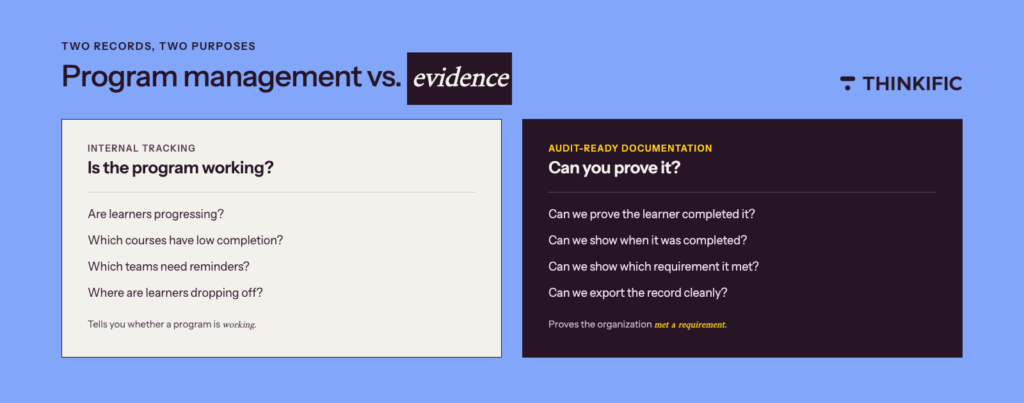
There’s a key difference between internal training tracking vs. audit-ready training documentation: internal tracking is designed for program management whereas audit-ready documentation is designed for evidence.
| Internal Tracking (Program Management) | Audit-Ready Documentation (Evidence) |
|---|---|
| Internal tracking helps teams answer these key questions: Are learners progressing? Which courses have low completion? Which teams need reminders? Which content is engaging? Where are learners dropping off? These questions are vital for the success of a training program. However, these questions are of little use to an auditor in regards to training compliance. | Audit-ready documentation helps teams answer these key questions: Can we prove the learner completed the required training? Can we show when it was completed? Can we show which requirement it satisfied? Can we export the record cleanly? Can we prove the record is complete and reliable? Can we respond quickly if an auditor asks for a specific group, time period, site, or training requirement? Audit-ready documentation provides hard data that is used to provide answers to questions about training compliance. |
Remember, internal tracking tells your organization whether a program is working. Audit-ready documentation proves the organization has met a requirement.
Related: The Top 5 Best Corporate LMS To Deliver & Manage Your Training
Common gaps in training records
The goal is to make your training records trustworthy and easy to defend. Here are some common gaps that make training records hard to defend:|
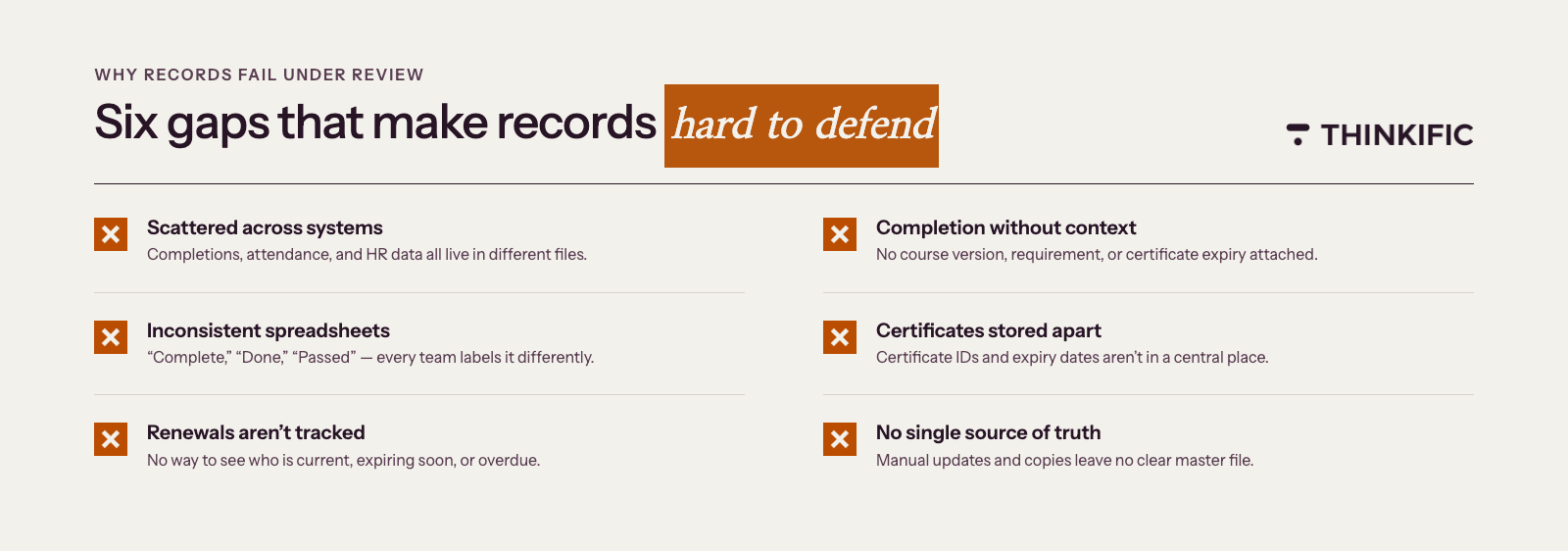
- The records are spread across too many systems: A single report is unable to tell the full story when employee data, course completion data, and live attendance records are all in different spreadsheets.
- Completion data exists, but context is missing: If a learner is marked as complete, but the report doesn’t show the course version, requirement, or certificate expiry, then the team has to manually explain what the completion record means.
- Spreadsheets are inconsistent: Different departments track things differently, with inconsistent naming conventions, date formats, and status labels. One team uses “Complete,” another uses “Done,” another uses “Passed,” and another leaves the cell blank.
- Certifications are stored separately from training records: The organization may need to chase individual learners for proof when certificate IDs, issue dates, or expiry dates are not in a centralized place.
- Renewal and expiry dates are not tracked: If a certification is valid for one year, but the training record only shows the original completion date, the team is unable to quickly identify who is current, expiring soon, or overdue.
- Manual updates create version control issues: If a training log is updated by multiple people, copied into different folders, or exported repeatedly, there is some ambiguity around which file is the source of truth.
How to build an audit-ready training records system
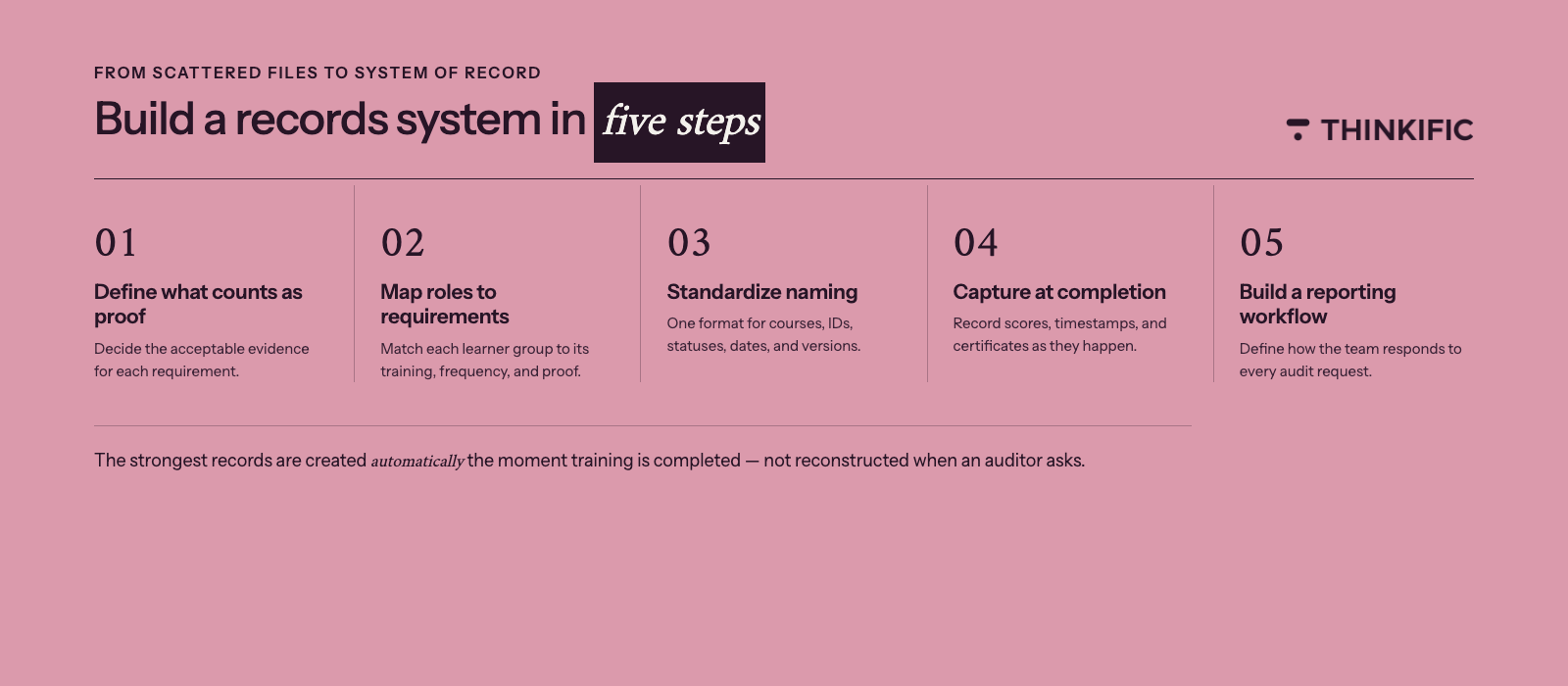
Here is a step-by-step guide on how to build an audit-ready training records system:
Step 1: Define what counts as proof
The first order of business is to start identifying what evidence is acceptable for each training requirement.
Here are some examples of what counts as proof:
- Course completion
- Passing quiz score
- Signed policy acknowledgment
- Instructor attendance record
- Certificate
- Credential renewal
- Manager sign-off
- Uploaded external certification
Proof can look different depending on your industry, which is why it’s important to not assume that every requirement needs the same kind of proof. For example, a safety certification may require more detailed documentation than an optional training module.
Step 2: Map training roles and requirements
Create a spreadsheet that allows you to capture all the data you need in one place. This can include things like role or learner group, required training, frequency, due date, required proof, owner of the training, and renewal or expiration period.
Here is an example of training mapping:
| Role | Required Training | Frequency | Proof Required | Owner |
|---|---|---|---|---|
| Customer support | Privacy training | Annual | Completion + attestation | Compliance |
| Field technician | Safety certification | Every 2 years | Certificate + expiry date | Operations |
| Partner reseller | Product certification | Annual | Assessment score + certificate | Partner enablement |
Step 3: Standardize naming conventions
When preparing for an audit, names need to be standardized across the board to prevent confusion.
It is recommended to have standard formats for these key items:
- Course titles
- Course IDs
- Learner groups
- Departments
- Completion statuses
- Date formats
- Certificate names
- Versions
Here is an example of a standardized naming convention:
➔ [Department] – [Requirement] – [Course Name] – [Version]
➔ Compliance – Privacy – Data Handling Training – v2026.1
Step 4: Capture data at the point of completion
To save either yourself or your team members hours of work, it’s a good practice to ensure that all training data is captured at the point of completion. When completion data, timestamps, scores, certificates, and learner details are all captured in the beginning, teams don’t have to search for this critical information later on.
Remember, the strongest training records are created automatically when the training is completed!
Step 5: Create a repeatable reporting workflow
To ensure your team is successful in organizing training documentation, it’s important to define how your team will respond to requests. This includes details such as: who owns the record, where the records are stored, which filters are used, which export format is used, how records are reviewed before submission, how long records are retained, and how evidence is archived after an audit.
Organizing these processes will make gathering compliance training records a much more seamless undertaking.
Here is a suggested workflow for training records management:
- Receive audit or client request
- Confirm population, requirement, and date range
- Pull report from system of record
- Review for missing or expired records
- Export CSV or PDF evidence package
- Save the final report in a controlled folder
- Document submission date and owner
Spreadsheet hygiene for teams not yet using dedicated software
For teams that are not ready to hop on the automation train and switch their training records to be managed by software, spreadsheets will do the trick — but only if they are structured.
If you’re not ready for a dedicated training management software, start with a standardized Excel training log template. Even better, use this excel training log template to keep tabs on trainee progress.
Here are some best practices to keep in mind for streamlining your spreadsheet hygiene:
- Use one controlled master file
- Lock formulas and headers
- Use dropdowns for status values
- Use consistent date formats
- Avoid free-text completion statuses
- Keep learner IDs consistent
- Add a “last updated by” and “last updated date” column
- Create a separate tab for requirements mapping
- Store certificates in a linked folder with consistent file names
- Review records on a set schedule
With these practices in mind, take a look at the recommended training log columns to include in your spreadsheet:
| Learner Name | Requirement Category | Certificate Issued |
| Learner Email | Assigned Date | Certificate ID |
| Employee ID | Due Date | Expiry Date |
| Department | Started Date | Renewal Required |
| Role | Completed Date | Evidence Link |
| Course Title | Completion Status | Notes |
| Course ID | Score | Last Updated Date |
| Course Version | Passing Threshold | Last Updated By |
Related: Guide To Training Program Templates
When spreadsheets stop being enough
Spreadsheets can be an effective tool for many teams — however, when the requirements become more complex, the real challenge falls in maintaining accurate records without relying on manual cleanup.
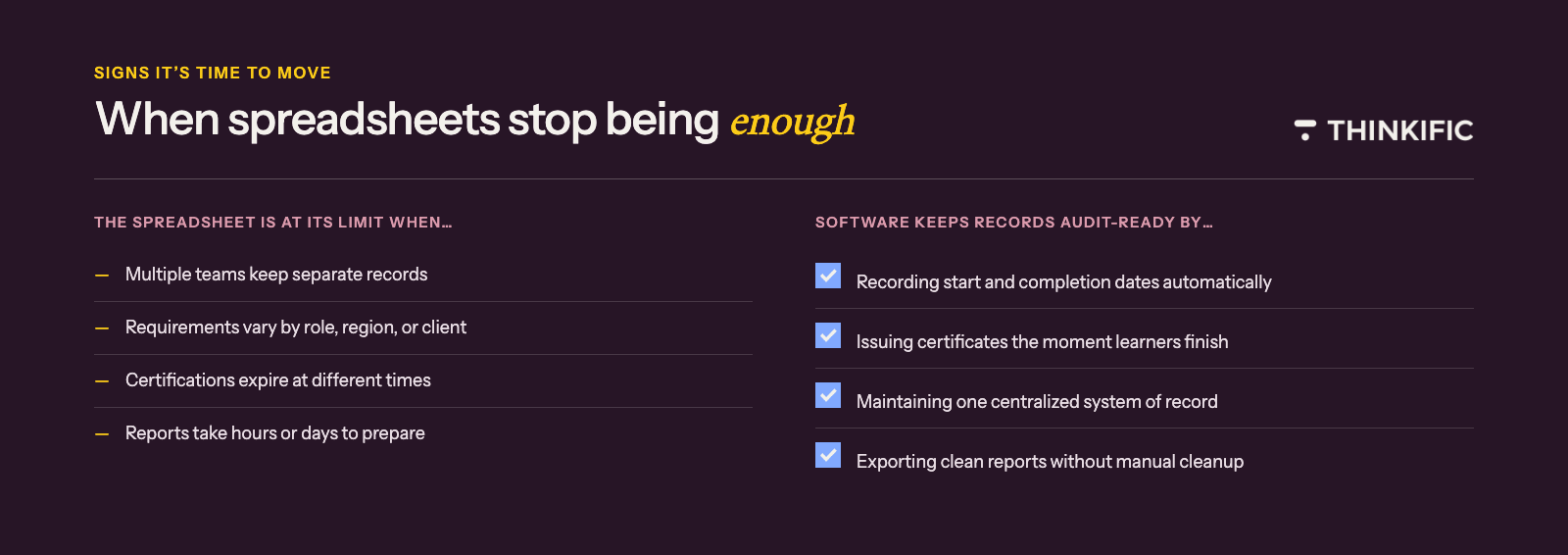
Here are a few signs that a spreadsheet-based process is becoming risky to use:
- There are multiple teams managing separate records
- Training requirements vary by role, region, or customer
- Certifications expire at different times
- Audits or client requests are becoming more frequent
- Reports take hours or days to prepare
- Records require manual follow-up
- Learners need automatic certificates
- Compliance managers need confidence in the source of truth
- Training teams need to prove completion across a growing academy
If you find that any of the above scenarios are happening, take this as a sign to move beyond spreadsheets and into compliance training software.
How software maintains audit-ready training records automatically
Compliance training software helps organizations create, deliver, and manage compliance training programs. This web-based technology facilitates online training, stores online learning data, and tracks student progress.
There are many benefits of compliance training software, including the ability to track important metrics and training effectiveness. While software doesn’t replace compliance obligations, it makes it easier to capture, organize, and retrieve evidence that’s essential to include in compliance training records. Think of this software as being an all-in-one tool that streamlines training processes for organizations.
Compliance training software can help teams:
- Enroll learners into required training
- Track learner progress
- Record start and completion dates
- Issue certificates automatically
- Export completion reports
- Segment learners by group, company, department, or program
- Maintain a centralized system of record
- Reduce manual tracking
- Support repeatable reporting workflows
- Give compliance managers and teams better visibility
For example, platforms like Thinkific Plus provide advanced reporting and analytics that help teams monitor learner progress and completion. This allows users to view progress reports and automatically assists training teams mapping start dates, completion dates, last sign-in activity, view rates, and completion rates. Compliance training software platforms like Thinkific are especially beneficial for larger organizations that need to view and export progress for specific learner groups.
With software, regulatory compliance is easier to create, deliver, track, and report on training more consistently, supporting internal reporting and audit preparation workflows.
Audit-ready training records checklist
Whether your team uses a team spreadsheet or team software, when it comes to training records compliance, we’ve put together a final master checklist to help prepare your organization for its next audit request, contract renewal requiring training documentation, or regulatory change that raises the bar on what records need to contain.
Here are the key items to include in your audit-ready training records checklist:
- Every learner has a unique identifier
- Required training is mapped to roles or learner groups
- Course names and IDs are standardized
- Course versions are tracked
- Assignment, start, due, and completion dates are recorded
- Completion timestamps include a consistent time zone
- Assessment scores and pass/fail status are captured where relevant
- Certificates include issue and expiry dates
- Renewal requirements are tracked
- Records can be filtered by learner, group, role, course, and date range
- Reports can be exported in a consistent format
- Evidence links are stored centrally
- Record ownership is clearly assigned
- Retention requirements are documented
- Reports can be generated without manual cleanup
Remember, audit-ready training records are structured, complete, and accessible on demand. The right system helps capture data from the start, so there’s no scramble when proof is required.
Still managing records manually? Download Thinkific’s Excel training log template to start standardizing your employee training documentation today.
Key takeaway: Build compliance training records that hold up
Compliance teams don’t fail audits because they skipped training. They fail because the records they have were built to answer program management questions, not auditor questions. The fields, structure, and workflows in this article give L&D and compliance managers a system that can stand on its own when evidence is requested.
That’s what audit-ready training records look like when the system is doing its job.
Track, report, and export with Thinkific Plus
Thinkific Plus captures learner progress, completion timestamps, assessment scores, and certificate data in one place, so your team can pull compliance reports and export evidence packages without manual assembly. Filtered views by learner group, course, date range, and completion status give compliance managers the records they need to respond to audit requests without scrambling.
Start a free trial or book a demo with the Thinkific Plus team.