

As an L&D administrator, HR manager, or IT administrator, have you felt frustrated due to an LMS that operates separately from the rest of your business systems?
If your LMS isn’t integrated, learner data stays trapped in separate systems, compliance records require manual reconciliation, and proving the impact of training is impossible.
Instead of making informed decisions with real-time data, your team spends valuable time updating spreadsheets, fixing duplicate records, and piecing together reports from multiple platforms.
According to MuleSoft’s 2025 Connectivity Benchmark Report, “The average enterprise now manages 897 applications, yet only 29 percent are integrated.”
Thinkific’s LMS Integrations Guide helps you connect your learning platform to the tools your organization already relies on, so training becomes a seamless part of your business process.
In this guide, you’ll learn how to connect your LMS with three core integration systems: Salesforce, HRIS platforms, and single sign-on (SSO) providers.
We’ll break down the protocols behind these integrations, including REST APIs, webhooks, SAML, OAuth, JWT, and SCIM. We’ll also walk through a practical four-step deployment framework and highlight the most common integration pitfalls so you can avoid them from the start.
Skip ahead:
- What is an LMS Integration and why does it matter?
- The three core LMS integration categories
- How LMS integrations work: protocols and technical foundations
- Step-by-step: How to plan and deploy your LMS integrations
- Common LMS integration pitfalls and how to avoid them
Key takeaways
- Salesforce, HRIS, and SSO integrations work together to automate data sharing, improve security, and create a more connected learning experience.
- With the average enterprise integrating only 29 percent of its applications, prioritizing LMS integrations helps eliminate data silos and reduce manual work.
- SSO and SCIM serve different purposes, SSO authenticates users while SCIM automates user provisioning and deprovisioning.
- Follow the four-step framework in this guide to plan, test, and launch LMS integrations with confidence.
What is an LMS integration and why does it matter?
An LMS integration connects your learning platform with the other business systems you use every day so information flows automatically.
The average enterprise now manages 897 applications, yet only 29 percent are integrated, leaving critical information scattered across disconnected systems. At the same time, 90 percent of organizations report business obstacles caused by data silos, making disconnected technology a barrier to growth.
As organizations continue their digital transformation efforts, seamless data synchronization has become an important part of modern enterprise software architecture.
Without integrations, small administrative tasks continue to be operational headaches. Teams spend hours entering the same information into multiple systems, learner accounts are duplicated or outdated, compliance records live in separate places, and reporting still requires stitching together data from spreadsheets and disconnected platforms.
Most enterprise learning strategies rely on three core integrations to solve these challenges. In this guide, we’ll walk you through Salesforce CRM integrations, HRIS integrations, and single sign-on (SSO) connections, along with the technologies and best practices that help them work together reliably.
The three core LMS integration categories
CRM integrations, HRIS integrations, and single sign-on (SSO) each solve a different challenge while working together to create a connected learning ecosystem.
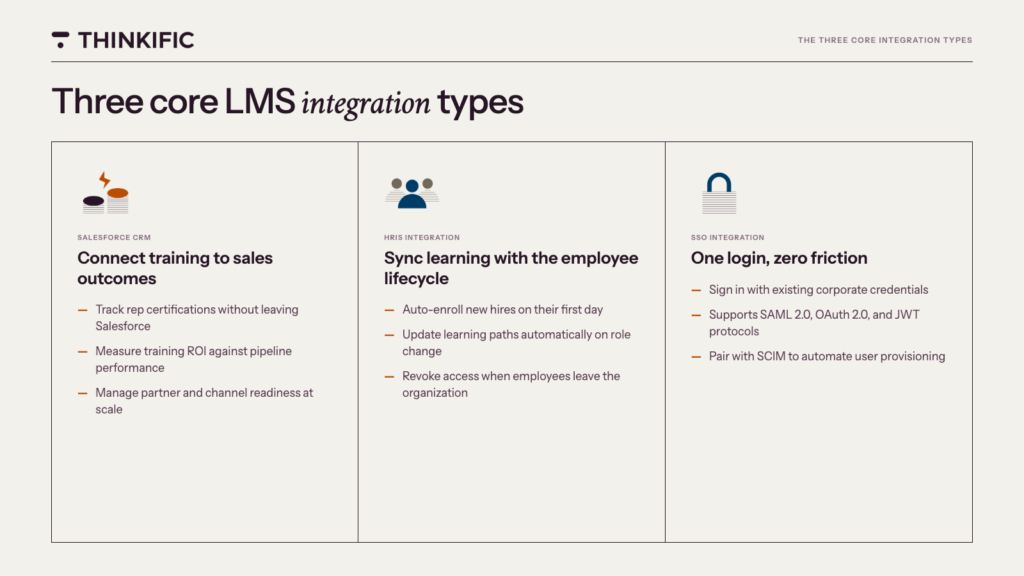
1. Salesforce CRM integration
A Salesforce LMS integration connects your learning platform with Salesforce CRM, syncing enrollment, course completion, and credential data between both systems.
- Sales enablement:
With CRM data sync, sales managers can see which reps have finished onboarding, earned certifications, or completed product training without leaving Salesforce CRM. This visibility helps managers coach more effectively, assign training at the right time, and ensure every seller is prepared before engaging with customers. - Partner and channel training:
Integrating your LMS with Salesforce makes it easier to deliver learning to distributors, resellers, and channel partners while tracking progress alongside partner account data. As your learners complete their certifications, these records stay connected to the people and organizations they support, making it easier to manage partner readiness at scale. - Training ROI measurement:
By linking course completion data to Salesforce opportunities, accounts, or pipeline metrics, you can compare training activity with sales performance over time. Instead of reporting on completions alone, you can begin measuring how learning contributes to revenue, productivity, and customer success.
Organizations can connect their LMS and Salesforce CRM in several ways, depending on their technical requirements. Native connectors offer the quickest path for supported platforms. Middleware tools such as Zapier and MuleSoft help bridge multiple systems with minimal custom development, and REST API integrations provide the flexibility to build custom workflows tailored to your business.
According to SelectHub, a Salesforce LMS integration synchronizes employee data, training records, and performance metrics between Salesforce and the LMS.
2. HRIS integration
An HRIS integration acts as a data bridge between your HR system and your LMS. It syncs employee records, including roles, departments, and employment status, so both platforms stay aligned.
- New hire onboarding:
When your HRIS and LMS are connected, new hires can be enrolled in onboarding courses as soon as they’re added to systems like Workday, BambooHR, SAP SuccessFactors, ADP Workforce, or Rippling.
- Role changes:
An integrated HRIS can automatically update user provisioning, assign new learning paths, and remove outdated course requirements based on an employee’s current role. Learning is aligned with employee lifecycle management without the need for manual updates.
- Employee departures:
When an employee leaves the organization, the HRIS can trigger updates that remove LMS access, preserve employee training records, and keep your user directory accurate.
HRIS integrations also simplify compliance. Because employee and training data stay synchronized, you can generate audit-ready reports without piecing together information from multiple spreadsheets or disconnected systems.
As Whatfix notes, “when an employee joins, changes roles, or leaves, the LMS updates instantly,” which helps organizations maintain accurate records throughout the employee lifecycle.
How LMS platforms like Thinkific connects to HR workflows: Organizations that need to sync learner or employee data between Thinkific and an HR system have three paths available.
The native HubSpot integration syncs learner enrollments, course completions, and contact data directly into HubSpot CRM records, giving customer success and enablement teams real-time visibility into learner progress without manual exports.
For teams connecting Thinkific to a specific HRIS, the Open API and webhooks provide the tools to build custom data pipelines that push enrollment, completion, and user data into any compatible system. Zapier automations offer a no-code path to the same outcome, triggering actions in connected tools when learners complete courses, earn certificates, or update their profiles.
3. SSO (Single Sign-On) integration
An SSO integration lets learners access your LMS using their existing corporate credentials from an identity provider such as Okta, Azure Active Directory, or Google Workspace, which eliminates the need for a separate username and password.
When employees have to remember a separate password or request account access before they can start training, completion rates suffer and support requests increase. SSO removes that friction because training feels like a seamless extension of the tools employees already use.
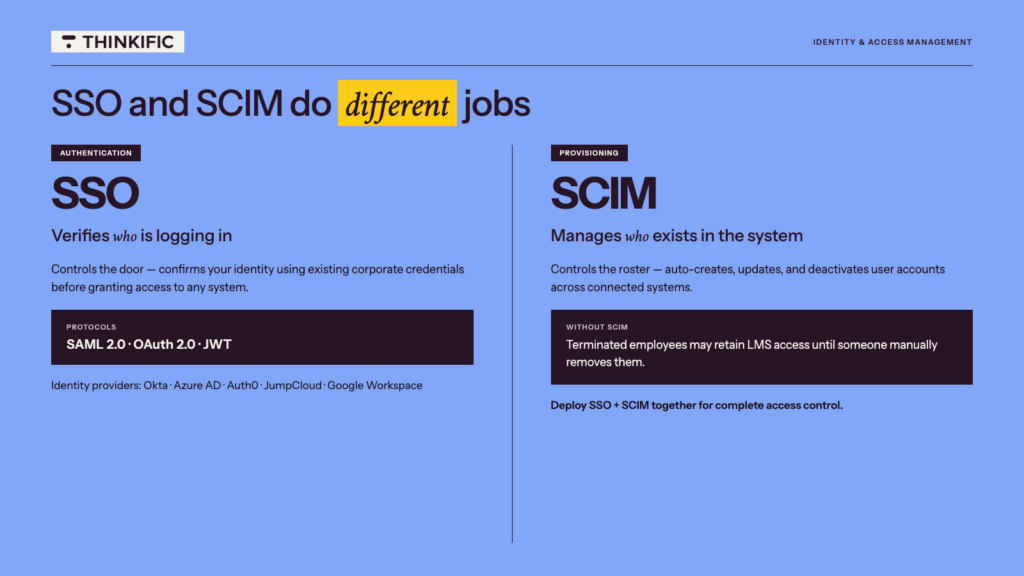
SSO manages user authentication. It confirms a person’s identity when they sign in through a single sign-on protocol such as SAML 2.0 or OAuth 2.0. SCIM handles user provisioning by creating, updating, and deactivating user accounts.
As Coggno explains, “SSO handles authentication while SCIM handles provisioning. Without SCIM, terminated employees may continue to have LMS access until their accounts are manually removed.”
Thinkific Plus supports enterprise authentication with leading identity providers, including Okta, Azure Active Directory, Auth0, and JumpCloud. Organizations that use custom SAML or OpenID Connect environments can connect through miniOrange. This makes it easier to integrate Thinkific into existing access control policies while delivering a secure, streamlined sign-in experience for every learner.
How LMS integrations work: protocols and technical foundations
When you understand the protocols behind LMS integrations, you can choose the right connection method for your technology stack.
REST APIs and Webhooks
A REST API is a standardized way for two systems to send and receive data on demand. This allows different platforms to communicate without requiring manual exports or updates. In an LMS environment, an API connector can help connect your learning platform with other business tools. This enables workflows like syncing user records, updating enrollment data, and sharing course completion information.
The key difference between APIs and webhooks comes down to how information moves. APIs pull data when a system requests it, while webhooks use automated triggers to push data when a specific event occurs.
To build a reliable integration, teams need to consider data mapping to ensure that fields in one platform match correctly with fields in another. They also need to create workflows to keep information accurate as it moves between tools. An API-driven approach gives organizations the flexibility to build custom integrations that support their unique learning and business processes.
Thinkific provides a complete REST API with webhooks, giving you the tools needed to create custom integrations and connect your learning platform with the systems that power your operations.
SAML 2.0, OAuth 2.0, and JWT for SSO
SSO relies on different protocols to securely verify user identity and grant access between connected systems. The right choice depends on your identity provider, LMS capabilities, and the requirements of your technology environment. No one protocol is universally better than another.
SAML 2.0 is an XML-based protocol widely used for enterprise SSO, particularly for browser-based user authentication. Many organizations use SAML-enabled connections with identity providers like Okta and Azure Active Directory so employees can access their LMS using existing workplace credentials.
OAuth 2.0 uses token-based authorization to allow applications to securely access information without sharing passwords. It’s commonly used for API authorization and third-party app access, and it’s a popular choice for connecting different tools within a broader technology ecosystem.
JWT (JSON Web Tokens) is a lightweight token format that allows platforms to authenticate users through a digitally signed token payload containing user information. Platforms like Thinkific use JWT-based SSO to help organizations create secure, streamlined login experiences.
SCIM for automated user provisioning
SCIM (System for Cross-domain Identity Management) is an open protocol that automates user account creation, updates, and deactivation across connected systems. Without relying on manual account changes, organizations can manage users at scale.
SSO verifies who a user is when they log in, while SCIM manages who exists in the system in the first place. This distinction is important in enterprise environments where strong access control policies and zero-trust security frameworks require organizations to continuously manage user access, roles, and permissions.
A SCIM-compliant integration can automatically add new users, update profile information, adjust user roles, and deactivate accounts when someone leaves an organization. If an employee is removed from an HR directory, SCIM can trigger the appropriate changes in the LMS instead of waiting for an administrator to manually update access.
Even with automation in place, SCIM integrations need careful configuration. Common issues include group naming mismatches between systems, large sync limits that slow down updates, and attribute conflicts when different platforms use inconsistent data structures.
As Coggno has stated, “SCIM breaks in three places: group naming mismatches, large group sync limits, and attribute conflicts.” Planning for these challenges upfront helps teams maintain accurate user provisioning and a secure learning environment.
Step-by-step: How to plan and deploy your LMS integrations
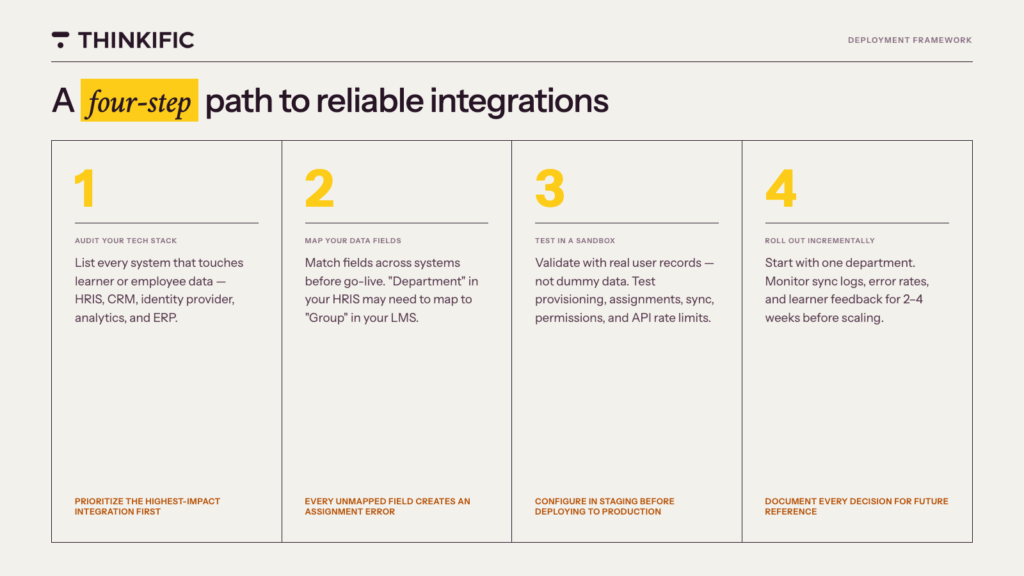
Follow this four-step framework to design, test, and deploy integrations that work reliably, whether you’re connecting Salesforce, your HRIS, or an identity provider, regardless of your LMS platform or tech stack.
Step 1: audit your current tech stack
Start by listing every system that touches learner or employee data. This includes your HRIS, CRM, identity provider, analytics platform, collaboration tools, enterprise resource planning (ERP) system, and other applications across your cloud infrastructure.
Then, prioritize the integration that eliminates the most manual data entry to reduce administrative work and deliver value faster.
Step 2: map your data fields
Data mapping is the process of matching fields in one system to the corresponding fields in another.
For example, Coggno states that a field labeled “Department” in your HRIS may need to map to “Group” in your LMS. Every field you leave unmapped creates a systematic assignment error, putting data integrity and data synchronization at risk.
Ensure learner data flows accurately across every system by resolving these mismatches before go-live.
Step 3: configure, test, and validate in a sandbox
Always configure your integration in a staging environment before you deploy it across your organization. Test with real user records, not just dummy data, to identify issues that may impact learners.
Before launch, validate key workflows including user provisioning, course assignments, sync completion, permissions, reporting accuracy, and API rate limits. A thorough testing process helps your team troubleshoot issues early and ensures your integration is ready to successfully deploy.
Step 4: roll out incrementally and monitor
Start with a small user group, such as one department or team, before deploying across your organization. Monitor sync logs, error rates, and user feedback during the first 2–4 weeks to identify issues and streamline the experience before scaling.
Document every configuration decision, workflow change, and troubleshooting step so your team has a clear reference as you continue to deploy and maintain your integrations.
Common LMS integration pitfalls and how to avoid them
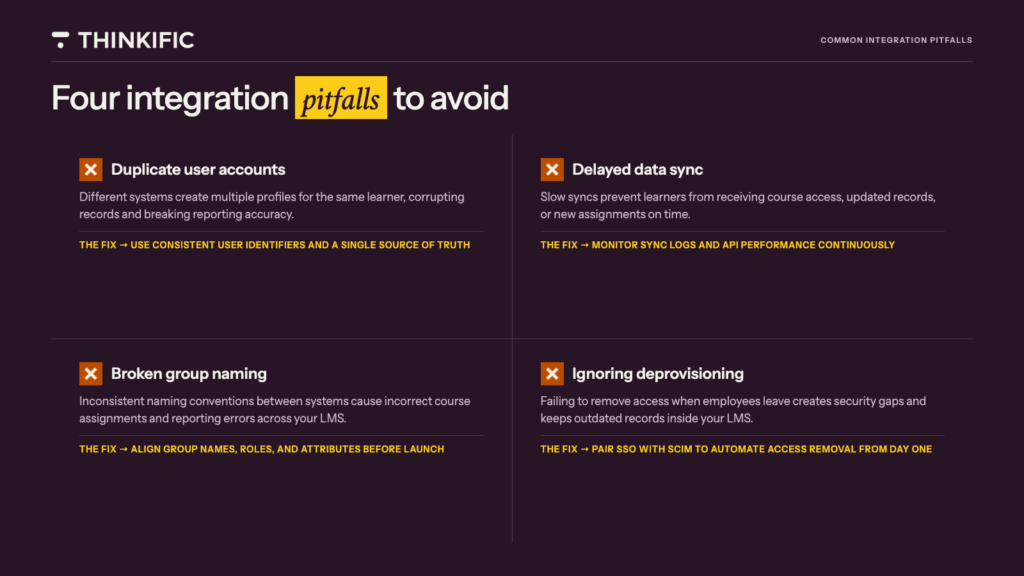
Even strong integrations can run into issues if key details are missed. Knowing these common pitfalls helps your team build a more reliable learning ecosystem.
- Duplicate User Accounts:
Different systems may create multiple profiles for the same learner, which can lead to inaccurate records. Use consistent user identifiers and establish a single source of truth for learner data. - Delayed Data Sync:
Slow syncs can prevent learners from receiving updated courses, access, or records on time. Monitor sync logs and API performance to catch issues early. - Broken Group Naming:
Inconsistent naming conventions can cause incorrect assignments and reporting errors. Align group names, roles, and attributes before launch.
- Ignoring Deprovisioning:
Failing to remove access when employees leave creates security risks and outdated records. Pair SSO with SCIM to automate user access updates.
The integrations that matter most aren’t the ones that are technically impressive, they’re the ones that reduce the manual work between your learning platform and the systems your team already uses every day. Salesforce keeping sales records current. HubSpot surfacing customer education progress. SSO removing the login friction that keeps learners from starting. Each connection shrinks the distance between training activity and business outcomes.
That’s what a connected learning platform looks like when the infrastructure is in place.
Connect your learning platform to the tools that drive growth
Thinkific Plus includes native Salesforce and HubSpot CRM integrations, enterprise SSO with Okta, Azure AD, Auth0, and JumpCloud, and a complete REST API with webhooks for custom data pipelines. For teams connecting Thinkific to HR workflows, the Open API gives you the flexibility to push enrollment, completion, and user data into any compatible system without waiting for a native connector.
Book a demo with the Thinkific Plus team to see how the integrations work and build a connection plan for your tech stack.
FAQs
1. What is an LMS integration?
An LMS integration is a software connection that allows a learning management system to exchange data with other business tools automatically.
These connections help sync important information like user records, enrollments, and course completions across platforms. The three key integration types are CRM integrations for customer and sales data, HRIS integrations for employee data, and SSO integrations for secure user access.
2. How does Salesforce integrate with an LMS?
Salesforce integrates with an LMS through native connectors, middleware platforms like Zapier or MuleSoft, and direct REST API connections.
These methods enable bidirectional data sync between Salesforce records and LMS data, which allows teams to track enrollments, course completions, certifications, and learner activity. This creates a connected view of training progress and customer or employee engagement.
3. What is the difference between SSO and SCIM?
SSO handles authentication by verifying who is logging in, while SCIM handles provisioning by managing who exists as a user in the system.
Together, these technologies support stronger enterprise security by controlling both access and user lifecycle management. SSO alone leaves a deprovisioning gap, meaning former employees may retain access until accounts are manually removed.
4. Which HRIS platforms integrate with LMS systems?
Workday, BambooHR, SAP SuccessFactors, ADP Workforce Now, and Rippling are some of the most commonly integrated HRIS platforms.
These integrations sync employee data, roles, and training records between systems, but the setup method varies by platform. When native connectors are unavailable, teams often use middleware tools like Zapier or MuleSoft to automate data flows.
5. Does Thinkific integrate with Salesforce and SSO providers?
Thinkific Plus integrates with Salesforce, HubSpot CRM, and enterprise SSO providers including Okta, Azure AD, Auth0, and JumpCloud. It also offers a complete REST API with webhooks to support custom integrations and automated workflows.
These connections help businesses sync learning data, manage user access, and build a connected learning ecosystem that scales with their needs.
6. What are the most common mistakes when integrating an LMS?
The four most common LMS integration mistakes are inconsistent user identifiers, skipping sandbox testing, deploying SSO without SCIM provisioning, and mismatched group naming conventions.
Prevent duplicate accounts by enforcing a single external ID, test integrations in staging before launch, implement SCIM alongside SSO from day one, and align naming conventions before connecting systems to ensure accurate data flow.
Watch the 5-minute demo, or request a call and build your customized plan with a member of our team today.