

According to A-LIGN’s 2024 Compliance Benchmark Report, 34% of organizations lost business because they were missing a required certification, up from 29% the year before. For most of those organizations, the certification itself was not the problem. The tracking was. Renewals lapse between review cycles, records live in spreadsheets that no one maintains, and audit preparation becomes a manual scramble that pulls people away from meaningful work. This blog article introduces certification tracking software, how to tell if it’s right for your business, and what to look for when evaluating your options.
Looking for something specific? Skip ahead:
- What does certification tracking software actually do?
- Who uses certification tracking tools? (+ 3 Examples)
- Why tracking software vs. spreadsheets?
- 4 signs you need certification tracking software
- The new tracking-to-training process
- 5 features of the best certification tracking software
- 5 top certification tracking tools to evaluate
- How to get started
What does certification tracking software actually do?
Certification tracking software is a helpful tool to remaining organizations when certifications or compliance audits are coming due. It replaces manual spreadsheet maintenance with automated visibility and reminders, so nothing slips through between review cycles. As part of the core functionality, it enables organizers and auditors to quickly see what has been completed, on what platform or location, and the status or renewal date.
More specifically, this is what the tool will enable you to do:
- Know which employees, members, or contractors hold current certifications in real-time
- Identify which certifications are expiring soon and by how much time
- Send automated renewal reminders to learners and their managers before deadlines arrive
- Produce a complete, timestamped compliance report on demand without manual record-pulling
- Keep certification records in sync with training completions when connected to an LMS
- Flag gaps where someone is missing a required credential entirely
Certification tracking software vs. certification management software: key differences
Although the term “certification tracking software” sounds almost identical to “certification management software,” there is a small but mighty difference between the two that drastically changes the core functionality of the tool. For anyone researching or purchasing these systems, this is an important note.
- Certification tracking software only identifies the completed training and the date of training per person. It is useful for those who have undergone the program (or are overseeing those people) and need to be aware of the renewal date so they know when to re-enroll in the next version.
- Certification management software assesses the full lifecycle of the certification itself, including the development, completion, and future edits. It’s more focused on the program to complete the training, and therefore built for those that sell or run certification programs.
Who uses certification tracking tools?
The need for certification tracking shows up differently across industries and organization types.
There are four main user groups of certification tracking software and examples of how it can be used in practice:
1. Employers in highly regulated industries
Regulated employers that oversee a team of staff that need to meet specific mandates or compliance requirements in order to legally work in their field (eg. in the healthcare, financial, and construction industries). Organizations need to know which designations are out of date to minimize liability and harm to their clients.
Example scenario: A regional healthcare network with 200 nurses needs to confirm that every staff member holds a current BLS certification before an upcoming Joint Commission review. Without a tracking system, the compliance manager spends three days emailing department heads and chasing down scanned certificates. With one, she runs a single report and has the full picture in minutes.
2. Professional accrediting associations
Professional associations and credentialing bodies that issue certifications to members and need to know which credentials are active, which are pending renewal, and which have lapsed. This insight enables them to offer badges to those that are still active, and encourage registration on new programs for those that have expired.
Example scenario: A national accounting association issues CPE certifications to 5,000 members on staggered renewal cycles. Manually following up with each member by email is inconsistent and time-consuming. A tracking system flags which members are within 60 days of expiry and triggers renewal reminders automatically, reducing lapsed memberships without adding administrative headcount.
3. Private training programs
Training providers and academies running internal learning programs that tie course completion to certifications. Tracking shows which learners have completed requirements and flags who needs to reenroll before their credential lapses, creating a natural re-enrollment opportunity without relying on manual outreach.
Example scenario: A corporate safety training academy delivers OSHA certification courses to clients across the construction industry. When a learner’s certification is within 90 days of expiring, the system flags it and sends a re-enrollment prompt automatically. The academy fills course seats without a dedicated sales effort and clients stay compliant without having to remember to reach out.
4. Companies looking to certify customers or partners
Software companies, manufacturers, and service providers often need to certify that their customers and partners can use, sell, or implement their products correctly. A customer certification program confirms product knowledge, establishes a standard of quality, and gives clients a credential they can reference externally. A partner certification program does the same for resellers and channel partners, ensuring consistency across the network.
In both cases, certification tracking software keeps the program scalable. As the number of certified customers or partners grows, the tracking system maintains an accurate record of who is certified, when credentials expire, and who is due for renewal, without requiring manual follow-up from the program team. For more on how to structure this type of program, see our article on certification management software.
Why use certification tracking software vs. spreadsheets?
Spreadsheets are a reasonable starting point for certification tracking. They are free, familiar, and easy to share.
However, they particularly struggle when you accumulate a lot of certifications that you need to keep on top of all the time:
- A spreadsheet cannot remind you when a certification is about to expire, and it often cannot automatically update a record upon completion of the renewal course (unless you have some complex coding built).
- Spreadsheets are difficult to filter at scale. Sure, you can add columns and custom rules that allow you to filter or sort down to the list of people that have training requirements coming up. However, this is still a very manual process and includes a high level of risk for human error once you start crossing into tens or hundreds of compliance checks that need to be completed every year.
- Spreadsheets have minimal access control. There is a lot less security on a spreadsheet, meaning employees can accidentally (or intentionally) manipulate data or share it to third parties without the organization’s consent.
4 Signs your organization needs a certification tracking software
Everyone loves the sound of a system to keep you organized ahead of schedule, but at what point does this become a “nice to have” and more of a necessity for your business to survive?
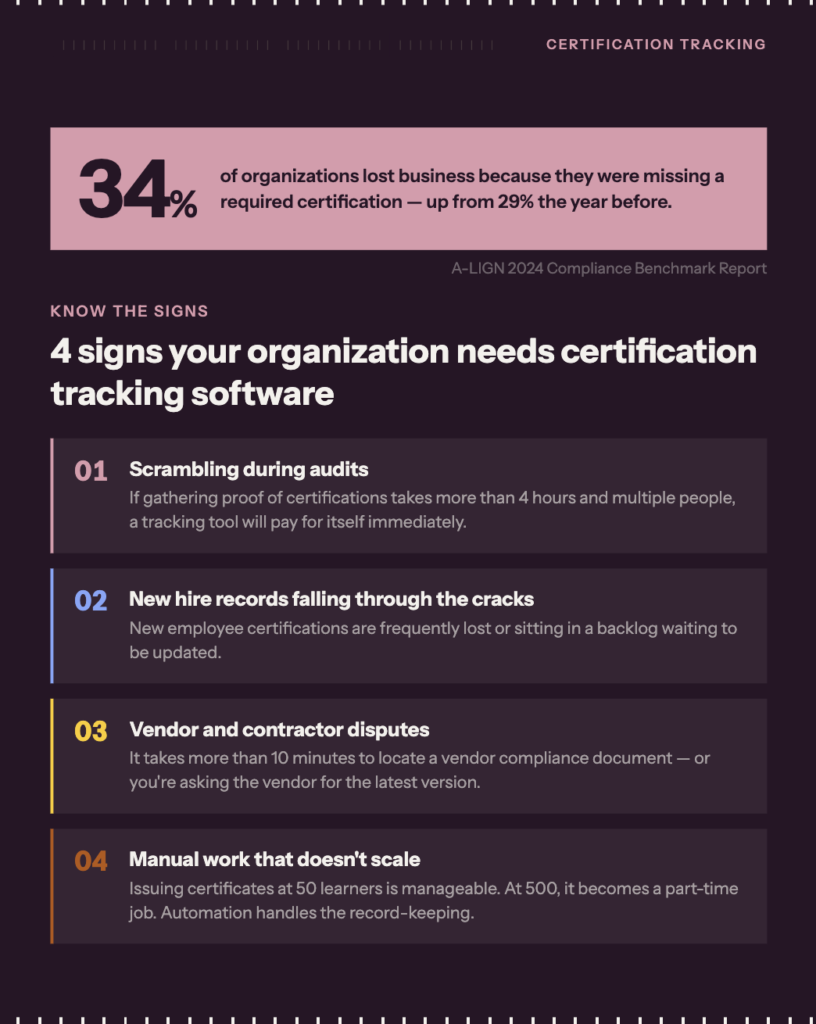
Scrambling during audits
In many regulated industries, auditors give less than a week’s notice before requesting a current certification roster. When that happens, someone on your team has to pull records from email threads, spreadsheets, and HR files manually. If the team can’t produce the necessary documentation in time, there’s a risk of losing licensure, earning fines, or failing a client review. According to A-LIGN’s 2024 Compliance Benchmark Report, 34% of organizations have already lost business because of a missing certification, and the number is trending up.
The defining line: Run a practice drill with your team and see how quickly you can gather proof of everyone’s certifications. If it’s less than a couple hours and doesn’t take away from meaningful work, then you may be good for now. If you are spending more than 4 working hours and needing multiple people to submit responses, you are likely wasting your time and could benefit from a professional tracking tool.
The new hire gap
In a fast-growing organization, employers need to have an easy way to import new records. Each new employee will have professional certifications they need to prove and maintain, and they will likely have training programs mandated by your HR or IT teams (e.g. workplace safety and cybersecurity knowledge training).
The defining line: If your HR or IT team is able to keep new hire records up to date without taking away from other strategic work, you are likely working in a good routine today. However, if new hire records are frequently being lost or are sitting in a backlog waiting to be updated, you should be seeking a tracking software that will take on the bulk of that management for you.
Frequent vendor or contractor disputes
Working with third-party vendors means looking into things like warranty, security or compliance certifications, and proof of professional designations from their employees. It’s important to keep tabs on these documents in case of a legal dispute where a contractor is claiming they support something differently than what you initially expected.
The defining line: If you are able to draw up proof of a vendor contract, warranty, or compliance document in under 10 minutes, you may be fine to continue operating as you are now. However, if you are frequently struggling to remember folder or file names, forgetting where things were saved, or asking the vendor for the latest version of the asset, then it is likely you need a better tracking system that will help you gain more speed and independence.
Automation will help you scale
If you’re running a training program that ends with a certificate, issuing that certificate manually is fine when your learner count is small. You send the file, log the record, set a calendar reminder for the renewal date, and move on. But that process doesn’t scale. At 50 learners it’s manageable. At 500 it becomes a part-time job.
Certification tracking software removes the manual work by triggering certificate issuance automatically when a learner completes the required coursework, logging the completion with a timestamp, and queuing renewal reminders without anyone having to track dates by hand. The same system that records a new completion can flag that completion as expiring 90 days out and prompt the learner to re-enroll, all without your team touching it.
The defining line: If you are spending meaningful time each month manually issuing certificates, updating completion logs, or chasing learners about upcoming renewals, that time is better spent on your program. Automation handles the record-keeping so your team can focus on improving the training itself.
The tracking-to-training connection
Say you go ahead and get certification tracking software. What would your new process look like internally?
- Upload your existing certifications into the tracking system.
Depending on how many you have, this could take a couple hours or even a couple weeks! You can always recruit your team to support with uploading their own documents. And, just remember that it will still be easier doing this mass upload now than spending the same amount of time to track everything down next time you have an auditor or customer concern. - Automatically send a system notification when a learner and their manager when a certification is flagged as expiring, removing the need for anyone to manually follow up.
You will need to have some reminders & assignment routing set up for this to happen automatically. For training providers and academies, this connection also creates a natural re-enrollment and sales opportunity, since expiring credentials are a clear signal that a learner is due for another course. - Have an integration set up to your learning management system (LMS)Completion data will flow back into the tracking system automatically once the course is finished, so the record updates without anyone logging in to do it manually. Without the integration, you can rely on employees to upload their proof manually, and then flag submissions for review by HR personnel.
5 features of the best certification tracking software
There are plenty of tools on the market that can help you track certifications and renewal dates more effectively than spreadsheets, USBs, and folders. If you’re ready for something more advanced but still user-friendly, consider certification tracking tools with these highly recommended features.
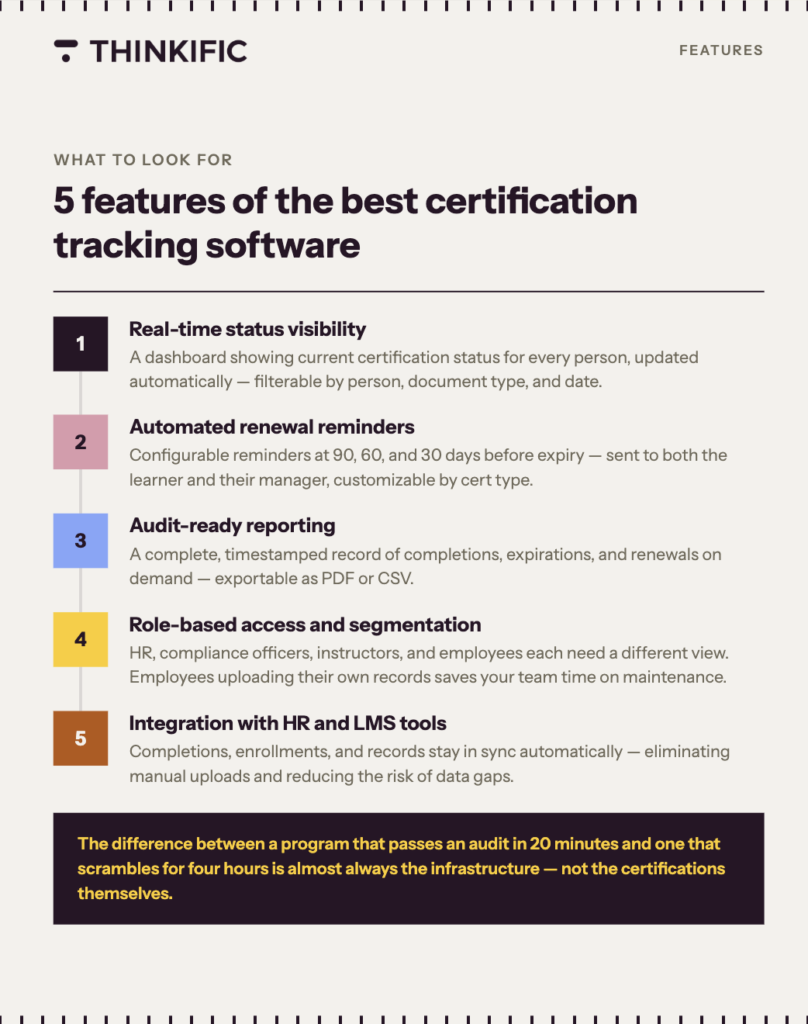
- Real-time status visibility:
A dashboard or report showing current certification status for every person in the program, updated automatically as completions and expirations occur. Ideally, you will be able to filter by person, document type, and dates. - Automated renewal reminders:
Reminder logic that fires at configurable intervals before expiry (90 days, 60 days, 30 days) to both the learner and their manager (or, the course instructor for private training academies). The best systems will let you customize reminders by certification type, since a first-aid card and an industry license typically do not have the same cadence. - Audit-ready reporting:
The ability to produce a complete, timestamped record of certification completions, expirations, and renewals on demand. This is what auditors and contract partners ask for. Look for an ability to export via PDF or CSV. - Role-based access and segmentation:
HR managers, compliance officers, program instructors, and employees often need different views. You want to enable employees to have some low-level access so they can upload their own reports for verification. This will save your team a lot of time on organization and maintenance. - Integration with HR and LMS tools:
Certification data should not live in a silo. Look for platforms that connect to existing HRIS or LMS tools so that completions, enrollments, and records stay in sync. A successful integration may even eliminate the need for employees to manually upload their certifications, which reduces data gaps or risk of human error!
5 top certification tracking tools to evaluate
To help kickstart your research journey, here is a list of the 5 best certification tracking softwares to date.
| Software name | G2 Rating | Best for |
| Thinkific Plus | 4.5 / 5 | Training delivery, automated certificate issuance, and audit-ready learner records in one platform: no separate tracking tool required |
| TalentLMS | 4.6 / 5 | Highly regulated industries |
| Certemy | No reviews | Dedicated to compliance tracking only |
| Expiration Reminder | 4.2 / 5 | General document expiry |
| Paycom | 4.5 / 5 | Integrations with HR systems (payroll and people data) |
How Thinkific customers handle certification tracking in practice
Virtual Fire Academy, led by Deputy Chief Peter Cutrer, delivers accredited fire safety certification courses to organizations including Disney, NASA, and Toyota through Thinkific.
With learners spread across multiple client organizations, Cutrer’s team needed a way to track who held current certifications, flag upcoming renewal dates, and produce records on demand without building a separate tracking system. By connecting course completions directly to certificate issuance in Thinkific, the academy handles the full cycle, from enrollment to certified record, in one place. When a certification approaches expiry, the system surfaces it automatically, so the team can prompt re-enrollment before the credential lapses.
How to get started
Keeping certification records current is one of those operational tasks that feels manageable until it isn’t. A spreadsheet works when your team is small and your certification load is light. As your program grows, the manual effort compounds and the risk of something slipping through grows with it.
The right certification tracking software removes that risk by keeping records current automatically, firing reminders before deadlines arrive, and making sure you can produce a clean compliance report whenever you need one. The difference between a program that passes an audit in 20 minutes and one that scrambles for four hours is almost always the infrastructure behind it, not the certifications themselves.
That’s what good tracking looks like when it’s actually working.
Run your certification program on Thinkific
Thinkific gives your team the tools to deliver training, issue certificates automatically on course completion, and keep learner records current and audit-ready in one place. For larger programs, training networks, or organizations reporting to multiple stakeholder groups, Thinkific Plus adds role-based access controls, automated report delivery, and the analytics to connect your training program to business outcomes.
Start a free Thinkific trial to explore certification and tracking features firsthand, or book a demo with the Thinkific Plus team if you’re managing certifications at scale across multiple teams or client organizations.