

If you’re a customer success manager, training manager, or product leader, you’ve probably tried to train customers with some mix of one-off webinars, static PDFs, and onboarding calls that only scale as far as your calendar allows. This approach works when you’re managing a handful of accounts. But as your customer base grows, it gets harder to keep up.
A dedicated LMS can fix that. It can help you standardize customer training, measure your outcomes, and track revenue metrics that leadership cares about. According to a Forrester study commissioned by Intellum, 90% of companies with formalized customer education programs have seen a positive return on their investment.
This article walks you through what a customer training LMS actually does and how to choose one that fits your team.
Here’s what we’ll cover, skip ahead below:
- What an LMS for customer training is (and how it differs from an internal LMS)
- High-impact use cases for a customer training LMS
- Must-have LMS features for customer training
- A step-by-step framework for choosing the right customer training LMS
Key takeaways
- A customer training LMS delivers structured learning to the people outside your company who use your product.
- The most common use cases of a customer training LMS include customer onboarding, product adoption & feature education, certification programs, partner and reseller enablement, and monetized training academies.
- The features that matter most are white-label portals, flexible content authoring with SCORM compliance, CRM integration, automated processes, and built-in engagement features like gamification and assessments.
- To choose the right LMS, map your use case(s) to the features that support them, check how well each platform integrates and scales, test it from the learner’s side, and weigh the full cost before you commit.
What is an LMS for customer training?
A customer training LMS is a platform for delivering structured learning to people outside your organization, primarily customers, but also clients and partners.
In other words, it teaches the people who use your product how to succeed with it. When customers know their way around your product, they tend to use more of its features, renew their contracts, and file fewer support tickets.
Businesses across many industries can benefit from an LMS for customer training, but SaaS and B2B companies especially need it, because it isn’t feasible to educate a fast-growing customer base one call at a time. An LMS helps them deliver training programs at scale, no matter how large their customer base gets.
How is a customer training LMS different than an internal or employee training LMS?
A customer training LMS focuses on scalability, self-service access, white-label branding, and CRM integration. Compliance tracking and mandatory attendance, which most employee training programs require, matter less when your learners are customers who choose to show up.
Technically, you can use the same LMS to train both your customers and your employees. After all, educating both groups involves delivering courses, tracking progress, and reporting on results. However, the way you run each program and the features you rely on won’t be the same.
Here’s how a customer training LMS and an internal LMS compare:
| Customer training LMS | Internal (employee) LMS | |
| Primary audience | The people who buy and use your product, including customers, clients, and partners outside your company | The people who work for you, including full-time employees and contractors |
| Branding | White-label branding matters, so your academy looks like a natural extension of your product rather than a third-party tool | Your own company branding works fine, since everyone learning already works for you |
| Enrollment | Learners usually sign themselves up, often right after they buy your product or create an account | A manager or the HR team assigns the training, and completing it is often required |
| Access model | Learners can access the courses whenever they want to, and can revisit specific modules when they have questions | Training tends to follow a set schedule, with deadlines that learners have to meet |
| Integration priorities | Connects to your CRM and product data so you can see how learning ties to account health and business outcomes | Connects to your HR and payroll systems, so learning records line up with employment history |
| Success metrics | Product adoption, customer retention, support ticket volume, expansion revenue | Compliance rates, employee retention, certifications earned, skill coverage |
| Scale | Designed to grow alongside your customer base (which can climb into the thousands) | Capped by the number of people you employ |
Read: The 10 Best LMS for Customer Training & Education
5 high-impact use cases for a customer training LMS
While features are important (and we’ll talk about them soon), the smarter way to choose a customer training LMS is to start with your use case(s). When you know the job the LMS needs to do, you can judge features against something concrete rather than a spec sheet.
Here are five use cases where a customer training LMS proves most useful.
- Customer onboarding
Customer onboarding is the process of getting new customers from signup to their first win with your product. A customer training LMS lets you build structured learning paths that walk them through that journey step by step, so they aren’t left to figure things out on their own.
Rather than conducting a live call for every new account, you can guide customers through setup, core features, and early best practices in a sequence they can follow at their own pace.
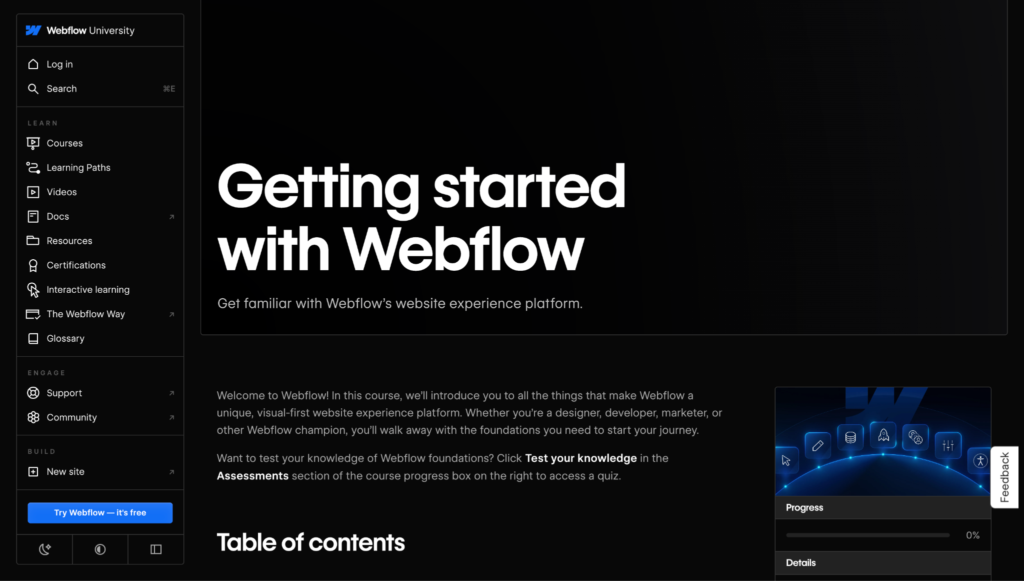
For example, Webflow created a 77-min course, Getting Started with Webflow, to help new customers familiarize themselves with the product.
Done well, structured onboarding:
- Reduces time-to-value, since customers learn how to use your product sooner
- Lowers the risk of losing customers in the early days, when they’re still deciding whether your product is worth it
- Frees your customer success team from repeating the same setup calls
- Gives every customer a consistent starting point, so no one misses the fundamentals
Many LMS platforms let you personalize customer onboarding. You can branch learners onto different paths based on their plan, role, or use case, so a new admin and a new end user each see training that fits their needs.
- Product adoption and feature education
Onboarding gets customers started, but their learning shouldn’t stop there. A customer training LMS lets you build ongoing product training that keeps customers engaged and brings them up to speed on new features as you release them. That way, the parts of your product you work hard to ship don’t go unnoticed by the people paying for them.
This training doesn’t have to be a full course that takes hours to finish. You can create microlearning modules (around 5–20 minutes each) or in-app tutorials that customers can revisit whenever they need a refresher.
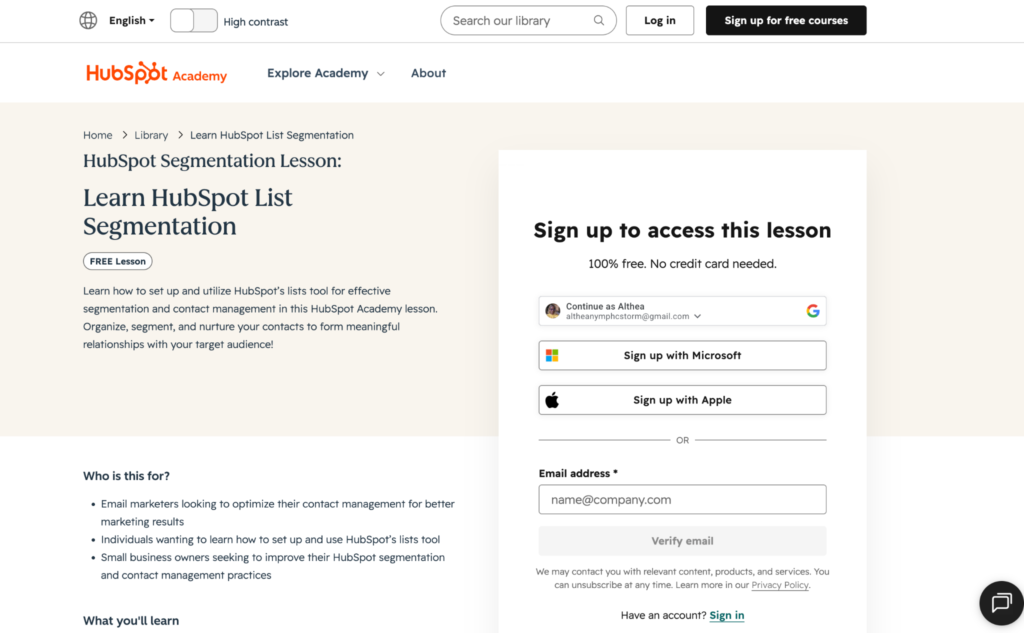
For example, here’s a 21-minute mini-course on list segmentation in HubSpot from HubSpot Academy. It comprises five shorter videos and a quiz.
Shorter formats fit into a customer’s workday, which makes them far more likely to use the training.
In the Intellum research, business leaders reported a 38.3% increase in adoption of the products their training targeted.
When customers understand how to use what you’ve built, that improvement carries into other metrics too:
- Higher NPS, since customers who know your product get more out of it and rate you accordingly
- Lower support ticket volume, because customers can answer their own questions instead of emailing your team
- Increased expansion revenue, as customers who master the basics are readier to buy add-ons and upgrades
- Certification programs
If your product is widely used across your industry, you may want to create a certification program for it. A certification program is a structured course that ends in a graded assessment, and customers who pass earn a credential that proves they know how to use your product or handle a specific workflow.
A customer training LMS handles the whole thing for you, from hosting lessons to scoring final assessments to issuing a certificate that learners can save and share.
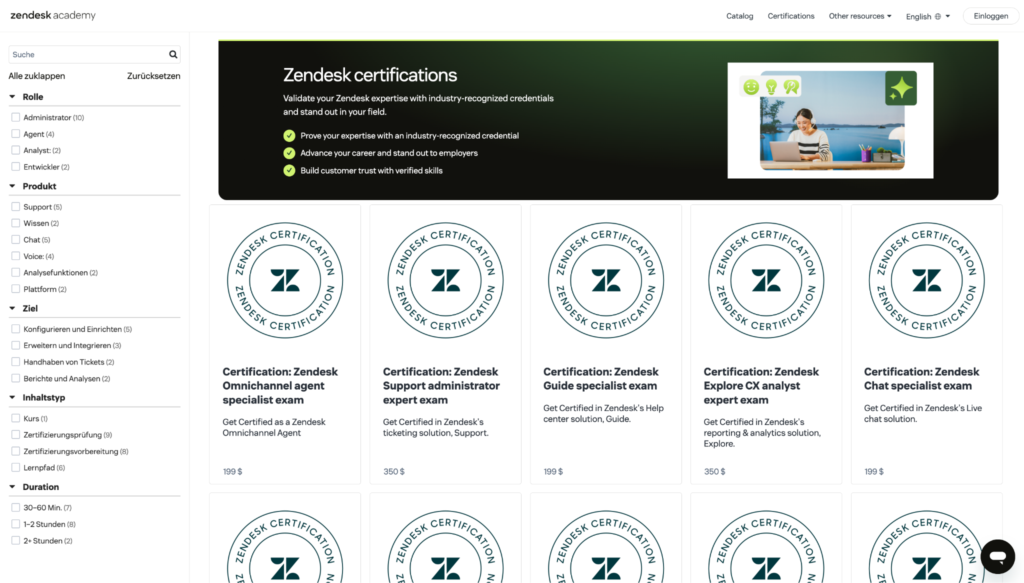
For example, Zendesk offers certification courses that let customers (and employees, too) become specialists in specific use cases, e.g., CX analyst expert, omnichannel agent specialist, and support admin expert.
Here’s what a certification program does:
- Customers feel recognized for their effort, which motivates them to keep learning about your product.
- Your company builds a growing pool of certified experts who know your product inside and out.
- Customers can add the credential to their resumes and LinkedIn profiles, using it to land jobs and advance their careers.
- When customers share their certification, your brand reaches their network, attracting new customers.
- Partner and reseller enablement
If you sell through partners or resellers, they need to know your product almost as well as your own team does, since they’re the ones putting it in front of new buyers. A customer training LMS lets you set up standardized training that gives every partner the same foundation for selling and supporting what you’ve built.
Some LMSs have a multi-tenant architecture, where a single platform hosts several independent learning environments, called tenants. Each tenant (or partner) gets its own branded training space, user base, admin team, and course catalog, while you manage the underlying infrastructure and updates from one place.
This use case requires integral features like:
- Single sign-on (SSO), which lets partners log in with credentials they already use, so they don’t have to manage another password
- Role-based access that controls what each person sees, so a partner admin and a frontline rep get the training that fits their job
- Automated enrollment, which adds new partners to the right courses as soon as they join.
- Monetized training academies
Customer training doesn’t have to be a cost center. If your courses, certifications, or bootcamps are valuable enough, customers will pay to take them—which turns your training into another source of income.
A customer training LMS helps you build and deliver these programs, but to sell them, you’ll need e-commerce features like:
- Payment gateways that let customers pay through multiple channels (credit/debit card, ACH, bank transfer, Google Pay, Apple Pay, Venmo, etc.)
- Subscriptions that charge customers on a recurring basis for ongoing access to your catalog
- Bundling, which groups related courses together and sells them as a single package
- Coupons and discount codes you can use to run promotions or reward loyal customers
- Tax handling that calculates the right rates automatically based on where your customer is
Pro tip: Choosing a platform with e-commerce features future-proofs your investment. Even if selling courses isn’t in your plans right now, an LMS that already supports paid content means you won’t have to switch platforms later if your business model shifts toward monetization.
Read: 10 Proven Monetization Strategies For Online Courses
Must-have LMS features for customer training
Once you know which use case (or cases) you need an LMS for, you can match them to the features that make them possible. That said, here are a few features worth considering, no matter your goal.
- Branded, white-label learning portals
When you host training on an LMS, you want it to look like an extension of your product, not a third-party tool.
An LMS with white-label capabilities lets you customize your courses’ branding to match your own. This helps you look more professional to your customers, which in turn inspires trust, reinforces their loyalty to your brand, and keeps the experience seamless as they move between your product and your training.
A good customer training LMS lets you:
- Customize your logo, colors, and fonts to match your brand
- Host your courses/customer training academy on your own custom domain so the URL stays yours
- Adjust the layout and page design so everything aligns with the rest of your product
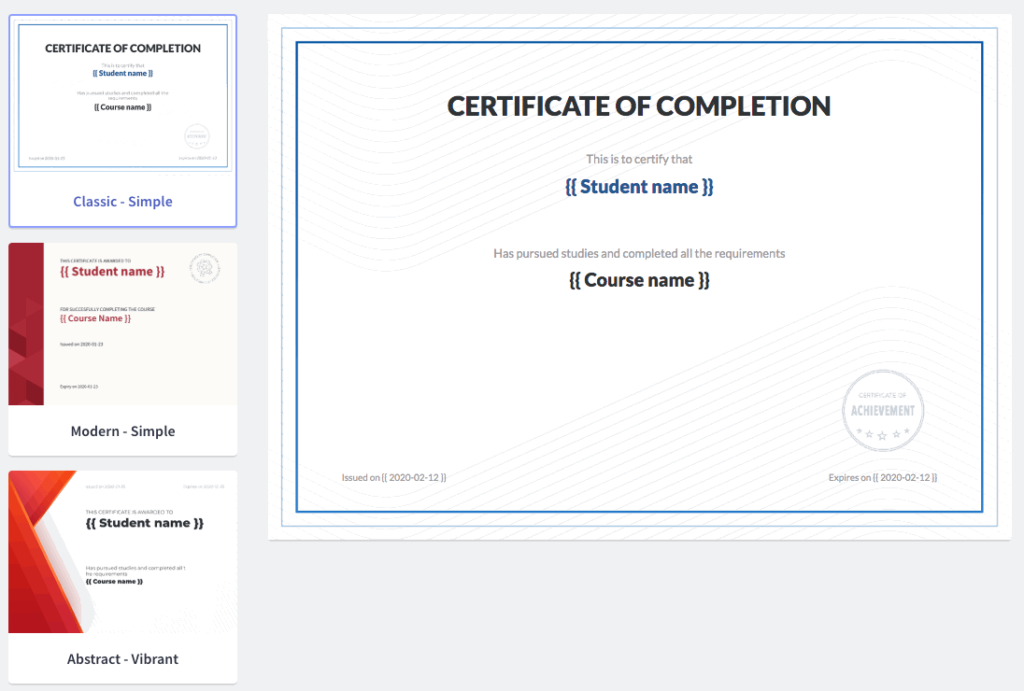
The best LMS platforms go further, letting you brand your login pages, email notifications, and certificates your customers receive, so your branding stays consistent everywhere customers see it.
- Flexible content authoring and SCORM compliance
Your LMS should support a range of content formats, including video, PDFs, quizzes, interactive modules, and live sessions.
Content formats are not one-size-fits-all, so sticking to a single format limits how well you can teach. For example, a quick concept can be explained in 2–3 short paragraphs, but a detailed setup process may require a 10-minute video and an accompanying PDF.
Here’s why format variety matters:
- Different formats keep customers engaged, so they aren’t stuck reading long blocks of text or sitting through hours of video.
- Quizzes and assessments let you gauge how much customers actually understand, so you can spot where they’re struggling.
- PDFs explaining a process can be downloaded, so customers can easily reference them later without having to scour the whole course to find an answer.
- A mix of formats lets you match each lesson to the way it’s best taught, which makes your training more effective overall.
Your LMS should also be SCORM-compliant.
For context, SCORM (and its modern successor, xAPI) is a set of technical standards that lets e-learning content work across different platforms.
A SCORM/xAPI-compliant LMS ensures that:
- The content you build in third-party authoring tools (like Articulate Storyline or Adobe Captivate) will load and run correctly in your LMS.
- You can track standardized data on how learners interact with the content, including course completion, quiz scores, time spent, and pass/fail status.
If you already have a library of e-learning content, a SCORM-compliant LMS lets you import it and start using it immediately, instead of recreating each course in your new system.
- CRM integration and training analytics
Your LMS should have built-in analytics that automatically track the metrics you need to prove your training is working.
Look for a platform that captures:
- Engagement metrics, e.g., course enrollments, completion rates, quiz scores, and how far learners get before they drop off.
- Progress metrics, e.g., time spent in each course and which modules customers revisit most.
- Revenue metrics, e.g., course sales, subscription revenue, and expansion revenue from customers who completed training.
- Certification metrics, e.g., how many customers have earned a credential and when those credentials expire.
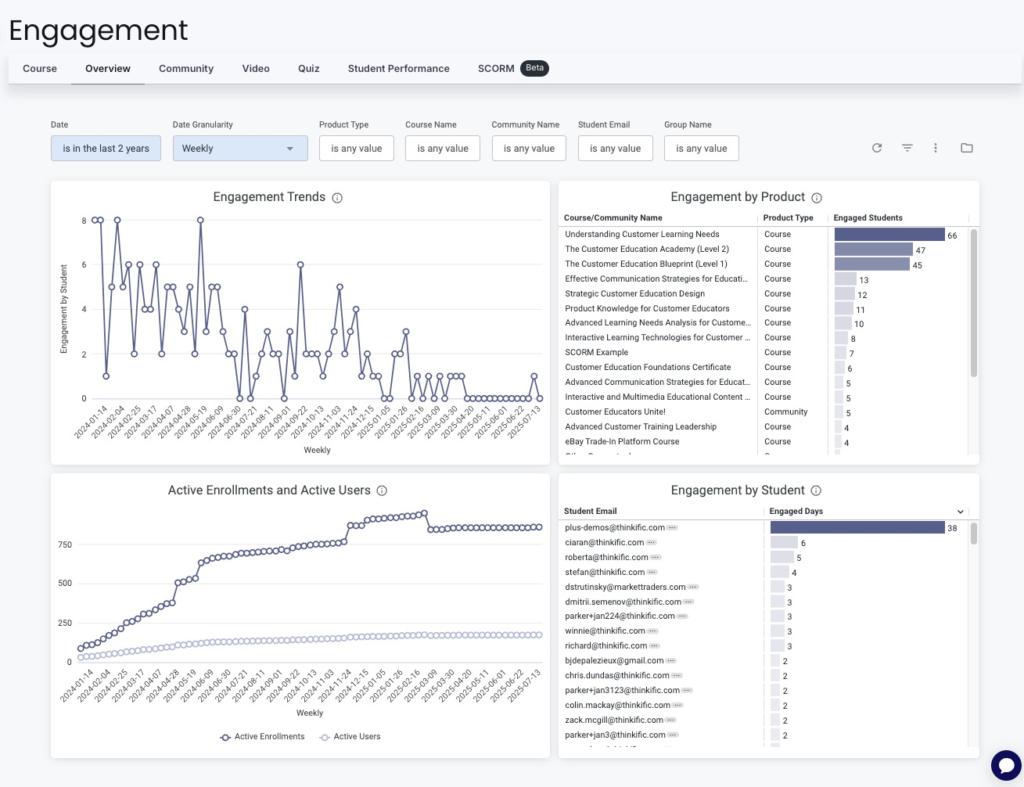
Since these learners are your customers, and you likely use a CRM to manage customer relationships, your LMS should integrate with your CRM. This connection lets training data flow into the same place you track account health, so your customer success team can see which customers are engaging with training and which aren’t.
From there, you can spot accounts that might be at risk, reach out to customers who’ve gone quiet, and connect training activity to outcomes like renewals and expansion.
- Automated enrollment, notifications, and learning paths
As your customer base grows, you can’t manually assign every course, send every reminder, and check on every learner’s progress. Your customer training LMS should handle these tasks automatically, so your team spends time improving the training instead of administering it.
Here are a few automation features to look for:
- Auto-enrollment. This automatically enrolls a customer in the right course the moment an action in your CRM calls for it, e.g., signing a contract or upgrading their plan.
- Drip-scheduled content. This is when an LMS releases lessons/modules on a set timeline instead of all at once, so customers don’t get overwhelmed and can work through the material at a steady pace.
- Reminder notifications. These automatically nudge customers to take specific actions, like finish a course they started, do a quiz, or return for a new module, without anyone on your team manually sending an email.
- Adaptive learning paths. Instead of sending everyone down the same track, an adaptive learning path automatically adjusts how a customer progresses based on their performance.
For example, if a customer aces the quiz at the end of your intro module, the LMS can skip them ahead to intermediate material instead of making them sit through basics they’ve already mastered. If another customer struggles with that same quiz, the LMS can route them to a review lesson before letting them move on.
This way, each customer gets training that matches their knowledge level.
- Gamification, assessments, and certifications
Getting customers to start a course is one thing. Keeping them engaged until they finish is another.
When you build a training program, you want elements that keep customers motivated from start to finish, and your LMS should give you a few ways to do that:
- Gamification. This includes elements like points for completing lessons, badges for hitting milestones, and leaderboards that let customers see how they compare to others. These small rewards give customers a reason to come back for the next lesson.
- Assessments. These are the quizzes and tests placed throughout a course to check whether customers understood the material. They help customers confirm they’re picking things up as they go, and they show you which lessons are working and which ones might need tweaking.
- Certifications. These give customers something tangible to work toward. People are far more likely to enroll in and finish a course when they know they’ll earn a credential they can add to their LinkedIn or resume once they’re done.
How to choose the right customer training LMS: A 5-step framework
There are hundreds of LMS platforms on the market, and most of them will claim to do everything you need. This five-step framework gives you a practical way to sort through them and find the one that fits your business.
Step 1: Map your use cases to required features
What you plan to use the LMS for determines which features you should prioritize. So before you compare platforms, list your primary use case (s) first, and use the table below to see which features you’ll need and which are nice to have.
| Use case | Required features | Nice-to-have features |
| Customer onboarding | Structured learning paths, progress tracking, automated enrollment, support for multiple content formats | Adaptive learning paths, drip-scheduled content, in-app tutorials |
| Product adoption and feature education | Microlearning support, reminder notifications, engagement analytics | Adaptive learning paths, in-app tutorials, gamification elements |
| Certification program | Assessments and quizzes, automated certificate issuing, pass or fail tracking, credential expiration tracking | Gamification, public certificate verification |
| Partner and reseller training | Multi-tenant portals, SSO, role-based access, automated enrollment | White-label branding per tenant, separate reporting per partner |
| Monetized academy | E-commerce (payment gateways, subscriptions, bundling), white-label branding, sales analytics | Coupons and discount codes, tax handling, tiered pricing |
Step 2: Evaluate integration depth
Your LMS won’t be the only tool your team uses, so it needs to integrate with the systems you already rely on, such as:
- CRM platforms (Salesforce, HubSpot, Pipedrive)
- Support platforms (Zendesk, Intercom)
- Marketing automation tools (Marketo, Mailchimp)
- Single sign-on (SSO) providers (Okta, Google Workspace)
- Analytics and data tools (Google Analytics, Looker)
- Payment processors (Stripe, PayPal), if you plan to sell courses
The depth of integration matters as much as the integrations themselves.
Here are the three most common integration levels:
- Native integrations are built and maintained by the LMS provider, so they tend to be the most reliable.
- Zapier-only connectors route data through a third-party tool (Zapier), which works but may limit what you can sync. Plus, you’ll have to pay for a Zapier subscription.
- API access lets your developers build custom workflows that standard integrations don’t cover, which is worth having if your setup is more complex.
When you evaluate an LMS, check not just whether an integration exists, but also which form it takes.
Step 3: Test the learner experience
Your customer-facing training has to be intuitive and frictionless, especially if your customers aren’t tech-savvy. If signing in or finding a course takes too much effort, customers will give up before they learn anything.
However, most platforms are sold to you, the admin, so the demo you see shows the admin view rather than the learner’s. To get around this, sign up for a free trial and go through the platform as a learner would. If the LMS doesn’t offer a trial, ask for a demo and specifically request a walkthrough of the customer-facing side.
As you go through it, check for:
- How easy it is to sign up and log in
- Whether courses are simple to find and navigate
- How well the experience holds up on mobile, since many customers will learn on their phones
- Whether videos, quizzes, and other content load quickly and play without glitches
- How clearly progress is shown, so learners always know what they’ve finished and what’s next
- Whether help or support is easy to reach if a customer gets stuck
Step 4: Assess scalability and multi-audience support
As your customer and partner base grows, your LMS needs to grow with it. The platform that works for a few hundred learners today should still work when you have several thousand, so choose one with that in mind.
Here are three things to check for:
- Scalability: During the demo or sales pitch, ask the team whether the platform can handle 10x your current learner count without slowing down or going offline. A good provider should be able to explain how their platform scales and point to existing customers of a similar size.
- Multi-audience support: This is the ability to train customers, partners, and employees from one platform, each through their own branded portal. You might not need it now, but if you expand into partner training or employee training later, having it available (even on a higher pricing tier) saves you from switching platforms down the line.
- Multilingual support: If you serve customers abroad or plan to, your training should reach them in their own language. So, look for a platform that lets you offer courses in multiple languages and adjust the interface to match.
Step 5: Calculate total cost of ownership
The subscription price you see on the pricing page rarely reflects what you’ll actually pay for an LMS. To budget accurately, consider the full cost of owning and operating the platform over time.
Here are some extra charges that can increase costs:
- Setup fees. Some platforms charge a one-time implementation fee to get you up and running, which can be significant for enterprise plans.
- Migration costs. If you’re moving existing courses and learner data from another system, some providers charge for the help.
- Per-user charges. Many platforms price by active user or learner, so your bill climbs as your customer base grows. Base your estimate on how many learners you expect to have, not how many you have today.
- Content authoring tools. If the LMS doesn’t include built-in authoring, you may need a separate tool like Articulate or Camtasia, which is an added cost.
- Dedicated support tiers. Priority support, a dedicated account manager, or faster response times often cost extra or require a higher pricing tier.
Once you add these to the subscription price, you’ll have a much clearer picture of what each platform actually costs, and a fairer basis for comparison.
Read: How to Choose an LMS: Find The Best System For Your Organization
Launch your customer training academy with Thinkific Plus
If you’re ready to turn customer education into a growth engine, look no further than Thinkific Plus. Our platform gives you everything you need to build courses and learning paths that educate your customers, partners, and clients on how to get the most from your product.
Thinkific Plus is straightforward to set up and easy for your customers to navigate, and it comes with key customer-training features like white-label branding, SCORM compliance, AI-powered course creation, robust integrations, and a dedicated Customer Success team to get you up and running quickly.
If you ever decide to monetize your training, Thinkific Plus offers built-in payment processing and sales tools like bulk selling and Group Orders, helping you turn your academy into another revenue stream.
Ready to see it in action?
Request a free demo of Thinkific Plus and start building your customer training academy today.
Frequently Asked Questions
- What is an LMS for customer training?
A customer training LMS is software that lets you deliver courses and structured learning to your customers, clients, and partners. Companies use it to onboard new customers, teach them (and existing customers) how to use a product, and keep them educated as that product evolves.
- How does customer training reduce churn?
Customer training reduces churn by helping customers get value from your product faster and with less frustration. When customers know how to use your product, they can confidently integrate it into their daily workflows, leverage advanced features, and see a clear return on their investment.
The more useful your product becomes to them, the less likely they are to cancel,
- What features should I look for in a customer training LMS?
Start with the highest-priority features:
- White-label branding
- Flexible content authoring
- CRM integration
- Automated enrollment
- Learning paths
- Analytics dashboards
- SCORM compliance
- Built-in assessment and certification tools
The right features depend on your primary use case, though. Customer onboarding calls for structured learning paths and automated enrollment, certification programs need strong assessment tools and certification delivery systems, and a monetized academy requires e-commerce features.
Map your use case first, then prioritize accordingly
- Can I use the same LMS for customer and employee training?
Sometimes, but the two use cases call for different things. Customer training prioritizes features such as white-label branding, self-service access, and CRM integration, while employee training relies more on compliance tracking and mandatory completion.
Some platforms support both through multi-audience features, letting you run customer, partner, and employee training from a single system with separate, branded portals. If you’ll need both eventually, choose a platform that offers this from the start.
- How much does a customer training LMS cost?
SaaS LMS platforms for customer training typically range from $99 to $500+ per month for standard plans, with enterprise tiers requiring custom pricing. Keep in mind that the subscription is only part of the cost. Setup fees, migration costs, and per-learner pricing can all push the total higher, so factor those in when you compare options.
- Is Thinkific Plus a good LMS for customer training?
Thinkific Plus is a great choice, with a feature set aimed squarely at companies training customers at scale.
Some standout features include:
- Support for multiple content formats, including video, PDFs, quizzes, and interactive modules
- SCORM compliance, so you can bring existing e-learning content over without rebuilding it
- Integrations with tools like Salesforce and HubSpot, so training data connects to your customer records
- AI-powered content tools that speed up course creation
- Sales tools like Group Orders and bulk enrollment to help you earn more from monetized courses
- A dedicated Customer Success team to help you launch and grow your program
- Multiple payment processing options, so you can sell courses and take payments directly through the platform